Photograph your roster. Never type it in again.
The printout in the break room, the PDF from your inbox, the screenshot from the staff portal: Shiftpool turns it into your shift plan in seconds – with your workplace’s own shift codes and times – and shows you every day to confirm before it lands in your roster.

How it works
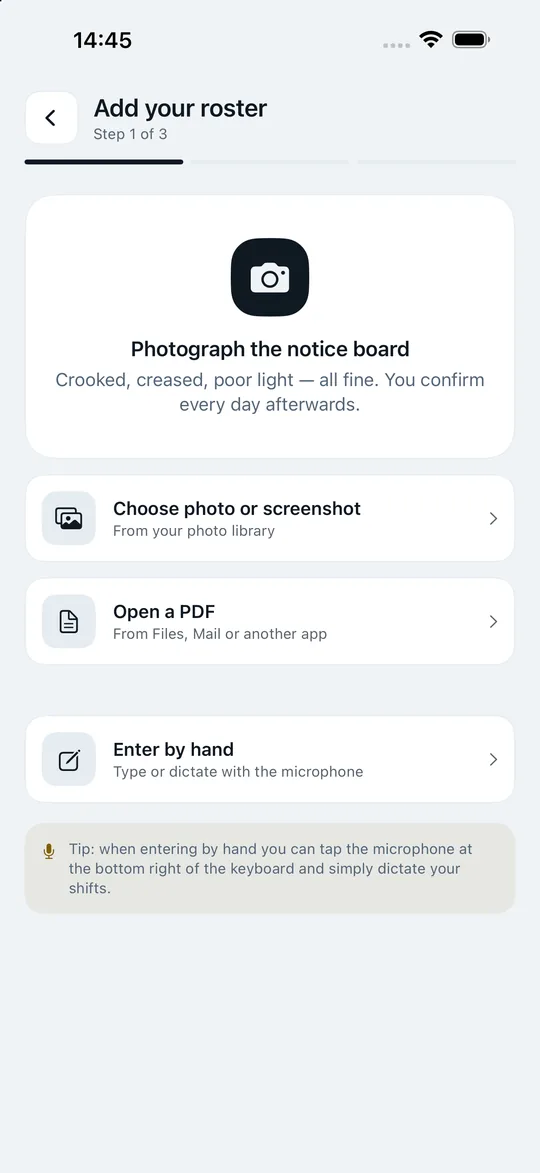
- Choose your roster: photograph the printed notice, pick a photo or screenshot from your library, open a PDF – or enter it by hand.
- Let it read: Shiftpool reads the date, weekday, shift code, start, end, hours and break. With PDFs it uses the embedded text first, which is more accurate than any scan.
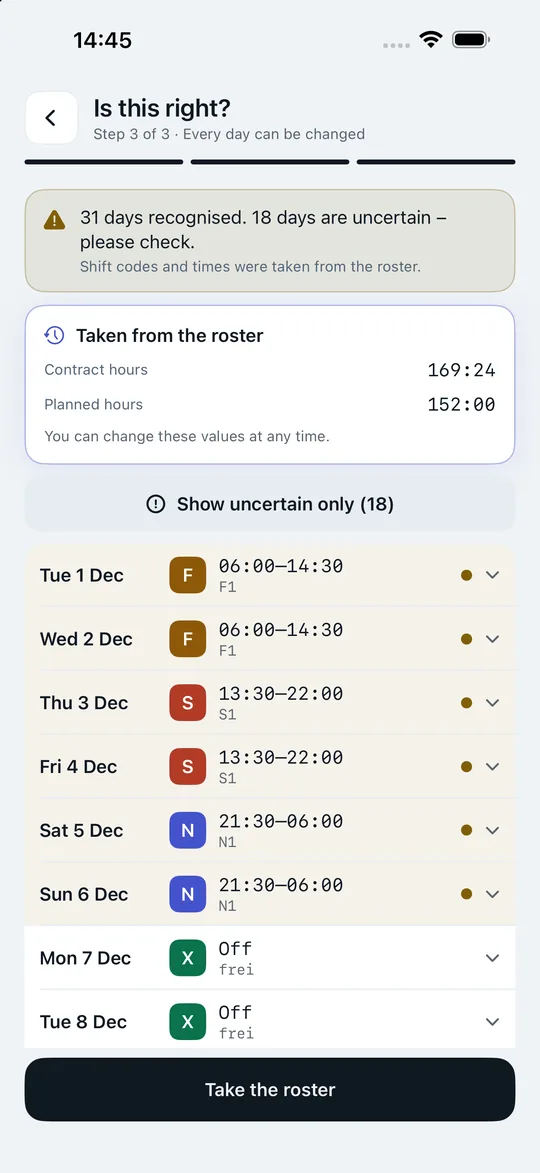
- Check and confirm: every recognised day sits on one line – date, shift, time, shift code. One tap unfolds it for editing. Anything the app is not sure about is marked: “Looks right” confirms the day and jumps to the next uncertain one, “Show uncertain only” hides the rest.
- Holiday, sick, time off in lieu: if the roster shows longer free stretches or codes like “U”, “UF” or “K”, the app asks about them – one tap applies it to the whole stretch, or you choose day by day.
The confirmation step is deliberate, not an exception. One wrongly recognised night shift costs more trust than ten correct ones earn.

Shift codes only your workplace understands
Real rosters rarely say “early” and “late”. They write S2b, S413, ZK_B or SG13 – and mean an area, a ward, a terminal. Shiftpool keeps these codes exactly as they are, shows them wherever the shift appears, and passes them along in a swap. The colour (early, late, night) is derived from the time: 3 to 12 is early, 12 to 19 is late, everything else is night.
Which rosters Shiftpool can read
| Format | Example |
|---|---|
| Table with columns | 01.12.2026 Di F1 06:00 14:30 8:00 0:30 |
| Simple lines | Mo 01.09. F 06:00-14:00 |
| Column-by-column tables | by the position of the words on the sheet |
| Dictation and typing | “Monday early shift, Tuesday off” |
With tables, the app cross-checks: end minus start minus break has to match the hours column. From the closing lines it also takes over your contract hours, scheduled hours and the balance of your hours account. If you import an older month afterwards, the balance from the newer roster stays.
Privacy: the image stays on your iPhone
Text recognition runs with Apple Vision and PDFKit directly on the device. No server, no third-party library, no upload. Your real name, staff number and company name from the roster header are deliberately not taken over – Shiftpool does not need them. The app only accesses your camera and photos once you tap to do so.
And when the roster changes?
The most common case in shift work: the phone rings and early becomes late. Nobody imports a new roster for that. In “My roster”, every day has the Changed button: new shift, time and where the change came from. The original state is remembered. If you import the next printout later, your change wins as long as your workplace has not actually rescheduled that day.
Frequently asked questions about roster scanning
Does it work with a skewed or creased photo?
The app straightens slightly slanted lines. Best to photograph straight on, without shadows or creases. Anything it is not sure about is marked so you can check it directly.
Is my roster uploaded to a server?
No. The image and the recognition stay on your iPhone. Your finished roster is also stored on the device and never reaches us.
What happens to days I have already changed?
When you import again, your decisions are kept: offers in the pool, swap requests, notes, hours taken as time off in lieu and changes you entered. What is taken over from your workplace is the shift type, shift code and times.
Can I dictate my roster too?
Yes. When entering by hand, tap the microphone on the keyboard and say, for example, “Monday early shift, Tuesday off”.
Your next swap takes three taps.
Get the app, create the group for your ward and send the code to two colleagues. From then on the pool fills itself – and your roster, your year and your hours account work from day one, even on your own.
Free download – for iPhone with iOS 17 or later.