Your colleagues are already waiting for you.
This code gets you into the Shiftpool group whose notice you’ve just scanned. It’s valid until the date and time printed on the notice.

- Get ShiftpoolFree on the App Store – use the badge above or search there for “Shiftpool”.
- Choose a nicknameNo account, no email, no password.
- Enter the codeTap “I have an invitation code” – and you’ll see your colleagues’ shifts.
Swap shifts.
Skip the group chat.
Shiftpool is the notice board for your shift team – just tidy. Put shifts in the pool, find colleagues who want to swap, and keep your whole roster in view. Free, no sign-up, and nothing your employer has to set up.
- Free, no ads
- No email, no password
- Your roster is read on your iPhone
- One group per ward – your colleagues join with a code
05:42 — The problem
“Can anyone do Saturday night?” – and then 87 unread messages.
This is how swapping works today: in the group chat, on the notice board, on a slip of paper in the break room. Requests get lost, a “maybe” turns into a yes, and in the end nobody turns up for the shift – or two people do.
MertWho’ll take Saturday night? 🙏
AylinHas anyone got the list for December?
TolgaMaybe me, need to check
LukasCar park is closed tomorrow!!
SabineIs Saturday still open? Otherwise I’ll swap for an early
Nadine👍
Mert@Tolga well?
One pool. Clear answers. And everyone knows where they stand.
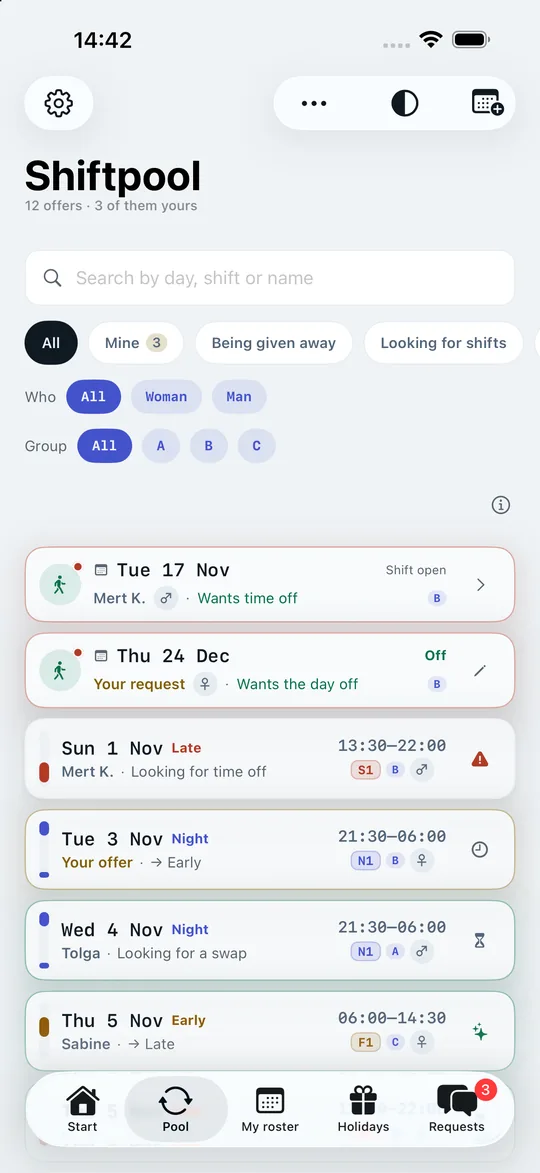
- Every shift is listed once – with day, time, shift code and what’s wanted in return.
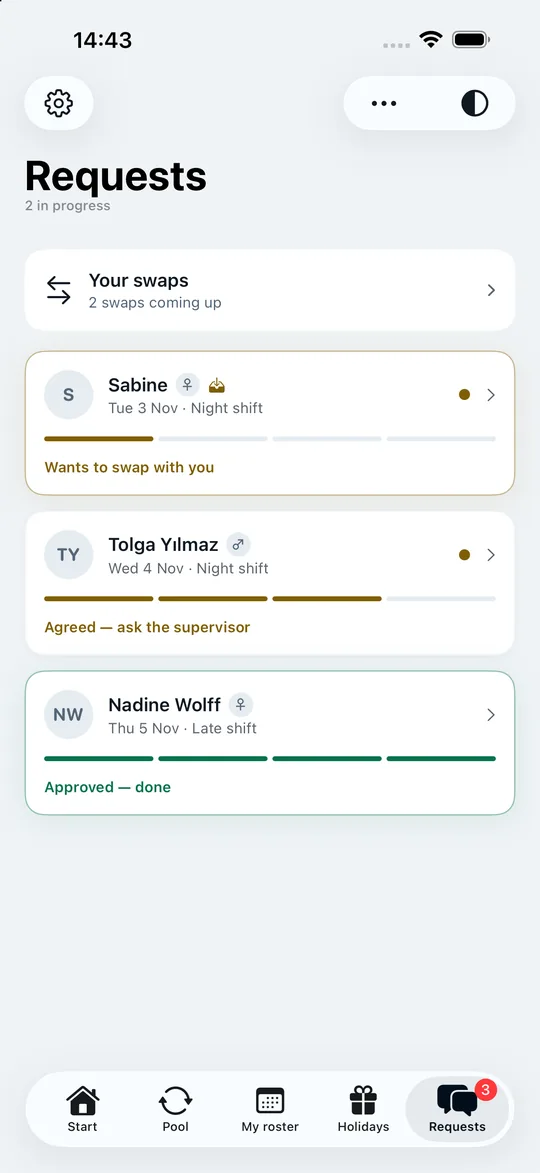
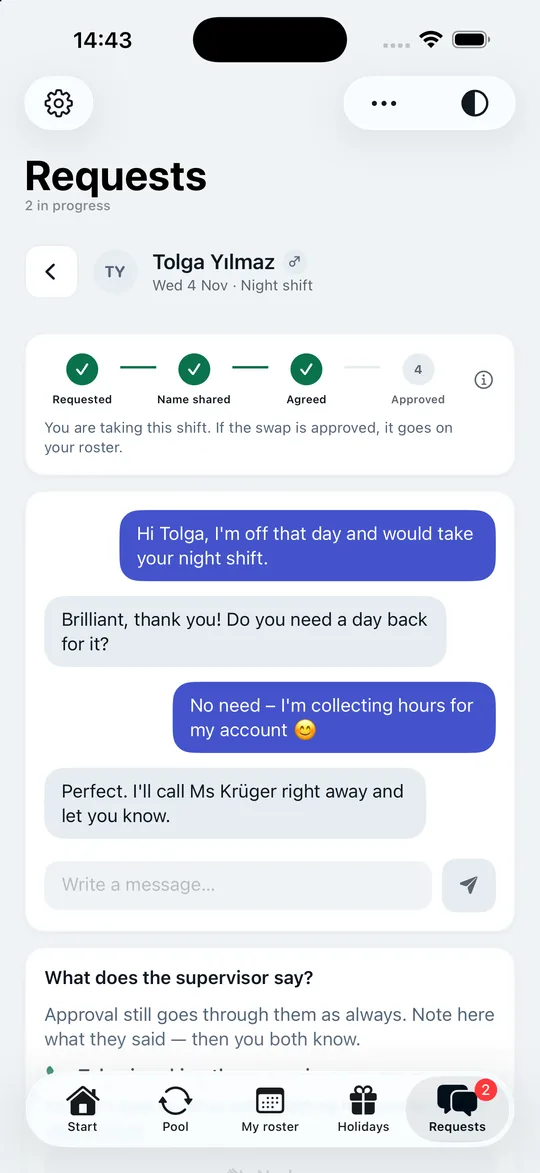
- Every swap has a status: requested, name shared, agreed, approved. No guesswork.
- You see at once what fits you – the app knows your roster and warns you when the rest time isn’t enough.
- Nobody sees your phone number. You swap under nicknames.
06:00 — The tour
The whole app. Just keep scrolling.
The iPhone stays put while you scroll – and shows you, step by step, what Shiftpool does. Nine stops, just as it will later sit in your hand.
-
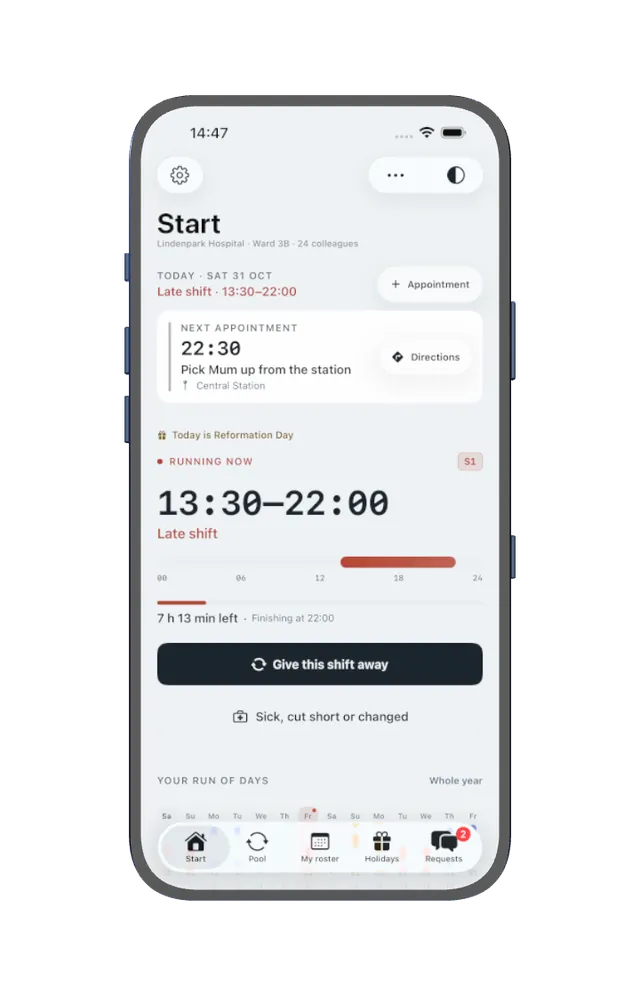
01 · Your day
When do I need to leave? It’s already there.
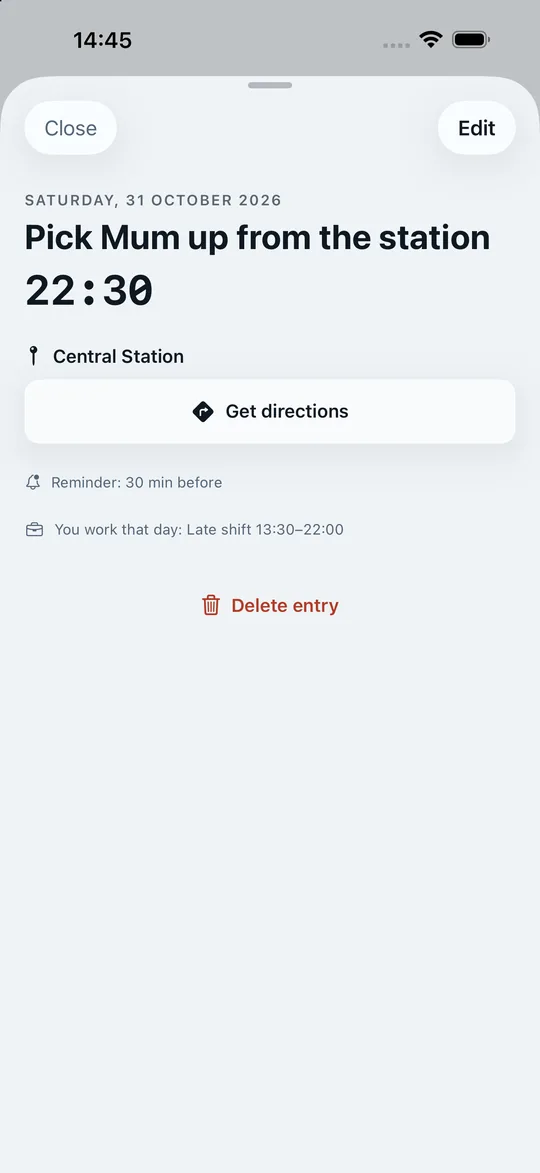
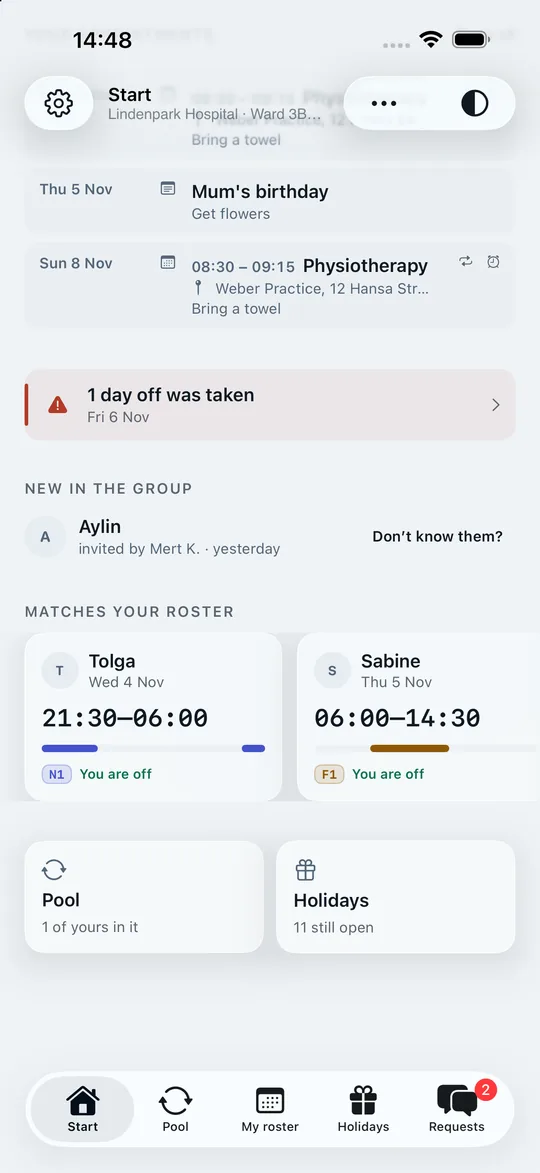
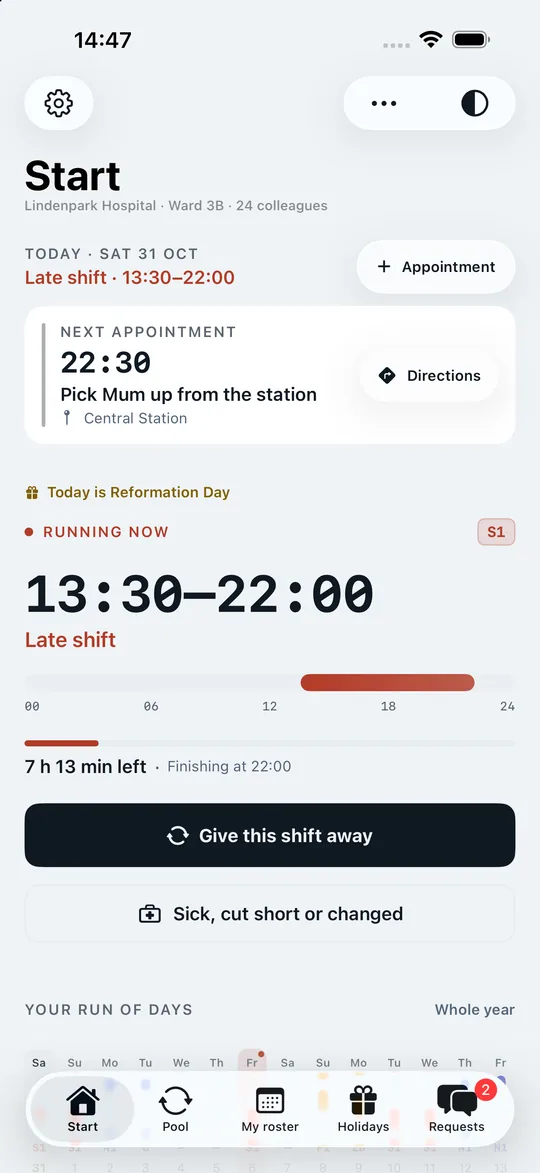
The running shift with its end time, the shift band, the next two weeks – and your next appointment with “Directions”. One tap shows the place, the reminder and your shift on that day; “Get directions” takes you there. You add new appointments with “Appointment”, with an alarm if you like, which from iOS 26 rings even in silent mode. Work and private life in one calendar, connected to your iPhone’s calendar if you wish.
-
02 · The pool
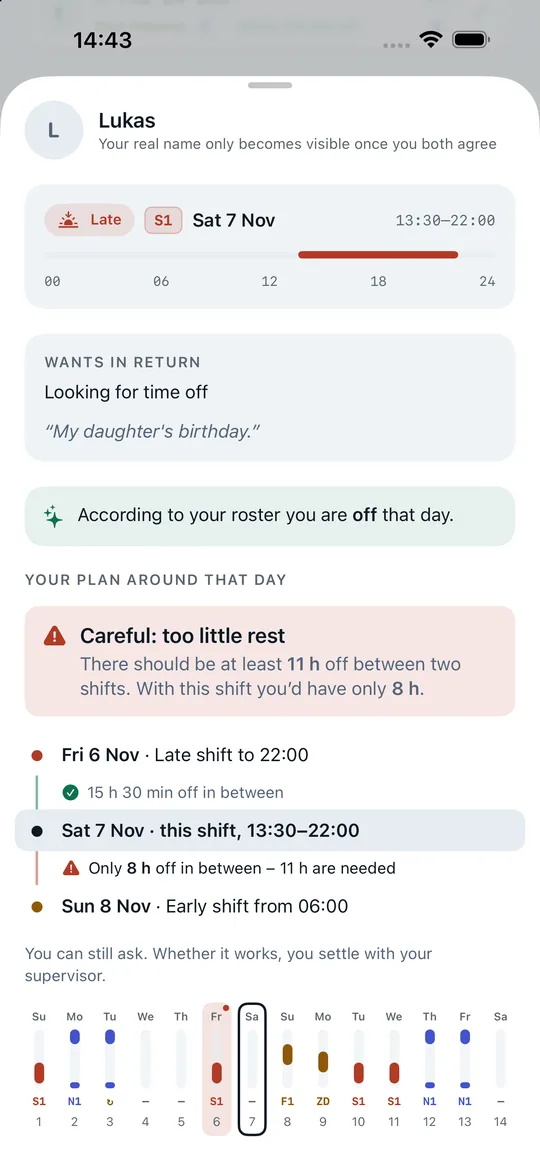
Every open shift. And which ones fit you.
The pool lists every shift on your ward exactly once – with day, time, shift code and what’s wanted in return. One tap puts your own roster next to it and tells you in one sentence whether it fits: enough time off, too little rest, or overlapping with your own shift.
-
03 · Swapping
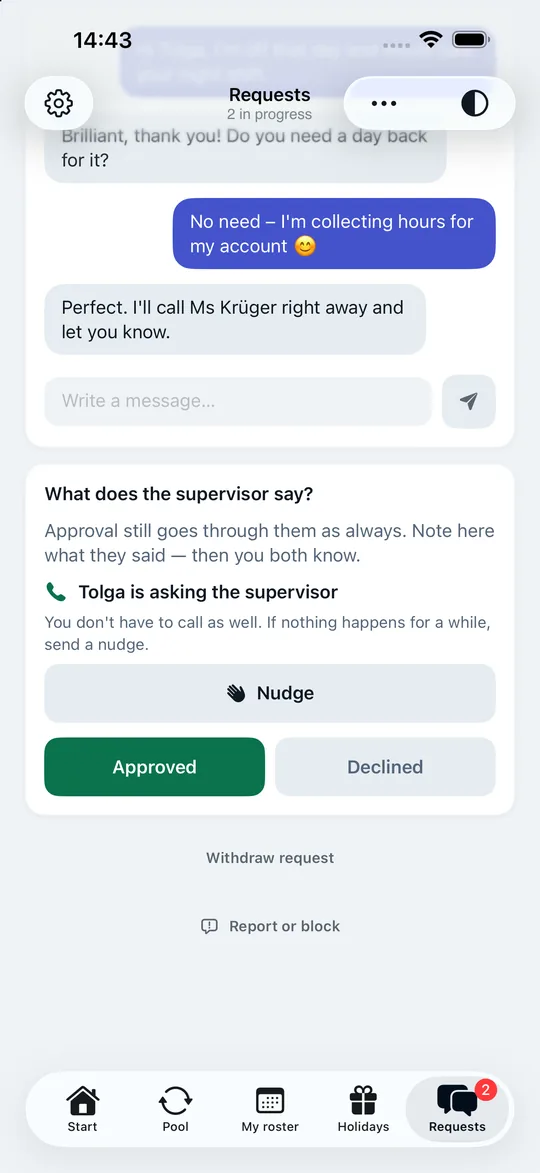
Request, agree, ask the supervisor.
Every swap has a clear status: requested, name shared, agreed, approved. The chat belongs to the request – no second WhatsApp. And the app remembers who calls the supervisor, so it’s neither nobody nor both of you.
-
04 · Your colleagues
No colleagues, no swap. That’s why inviting takes a minute.
The first person creates the group – “Ward 3B”, “Terminal 2”, “Fire Station 4”. Everyone else joins with a six-digit code you send by message, or via the printed notice with a QR code on the notice board. A nickname is enough, nobody needs an account. Whoever is new appears on everyone’s Start screen for a week – and even with three of you, the first swap is worth it.
-
05 · Roster
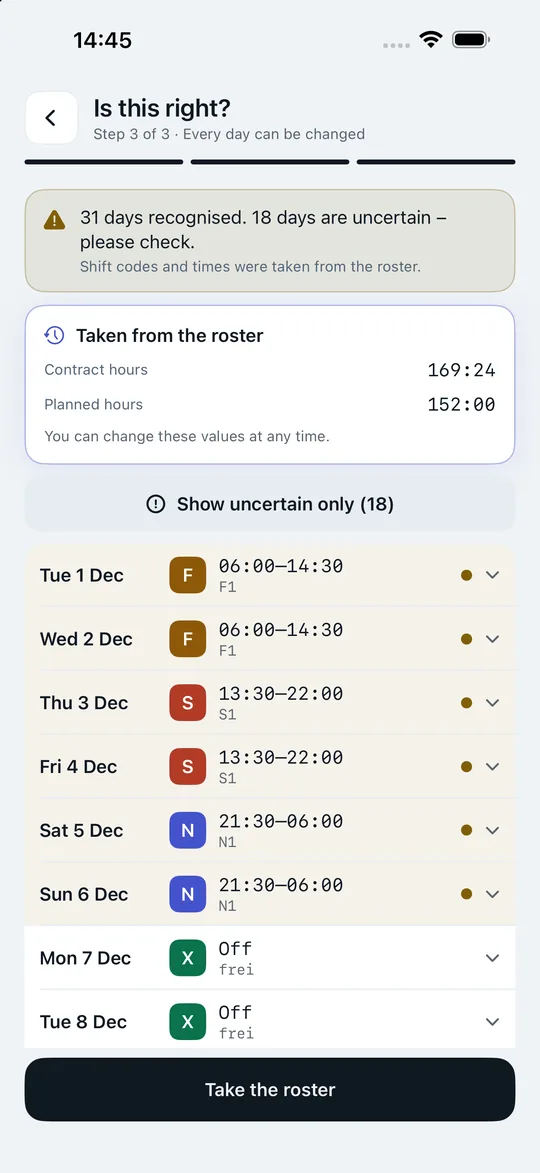
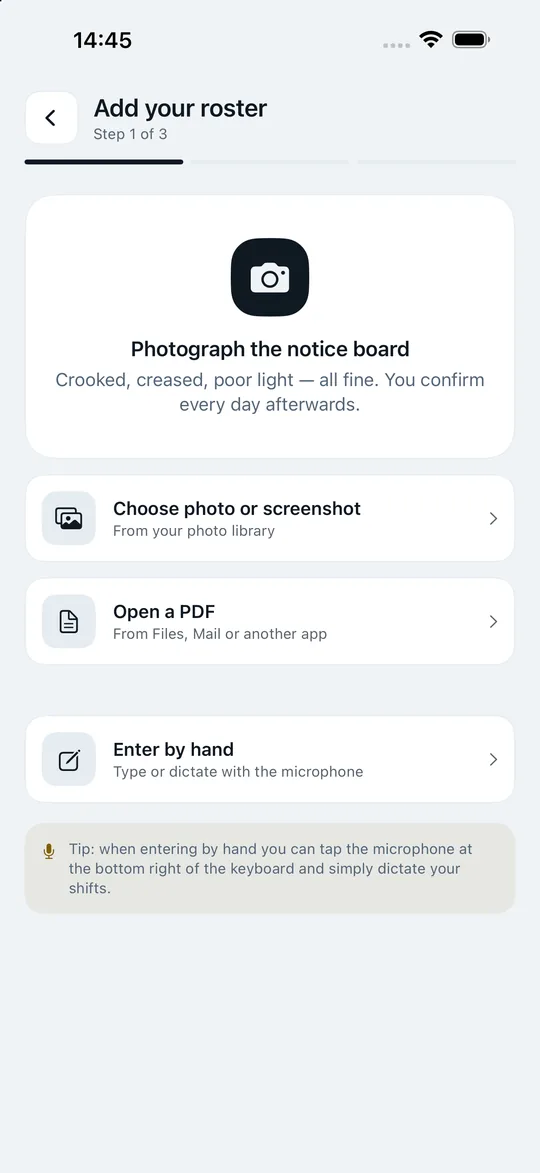
Snap the printed roster. Your month is done.
Shift codes, times and hours are recognised right on your iPhone – the photo never leaves your device. Every day sits on one line, uncertain ones are marked and quickly confirmed with “Looks right”. If the roster shows leave, the app asks: holiday, sick or time off in lieu?
-
06 · Your year
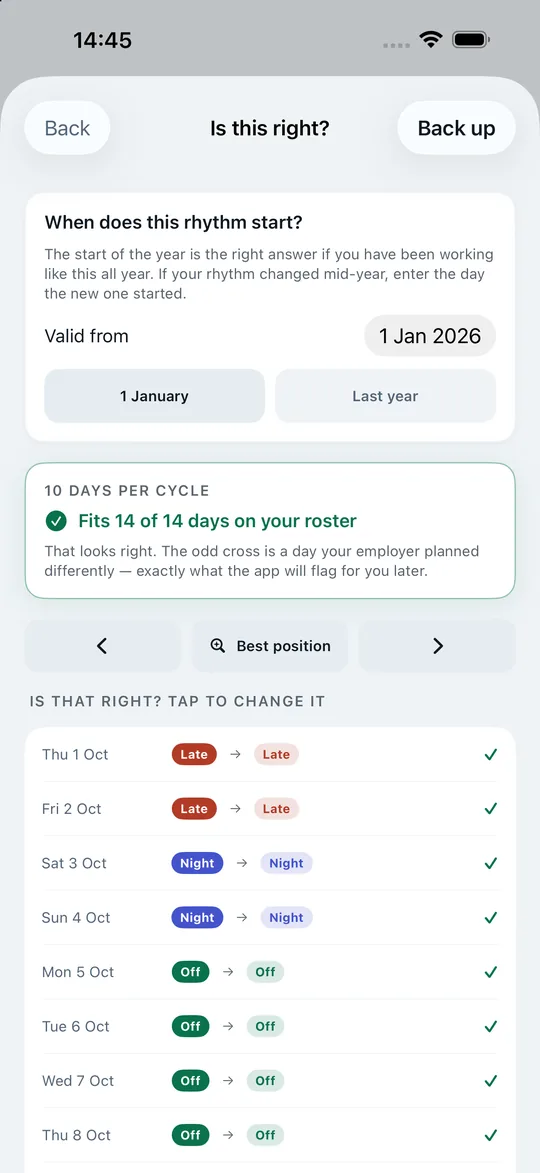
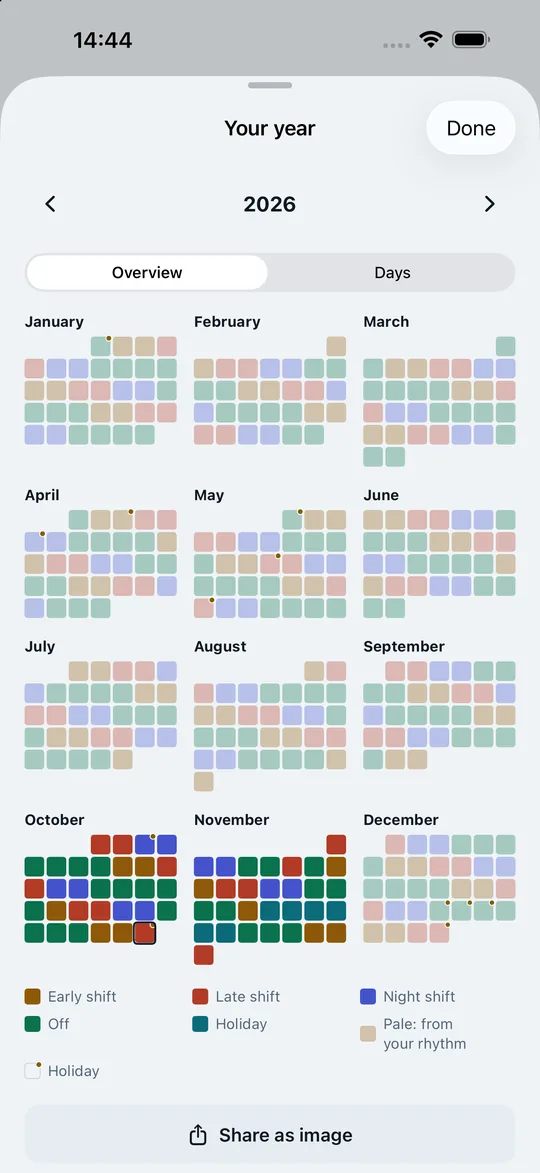
Enter your rhythm. See the whole year.
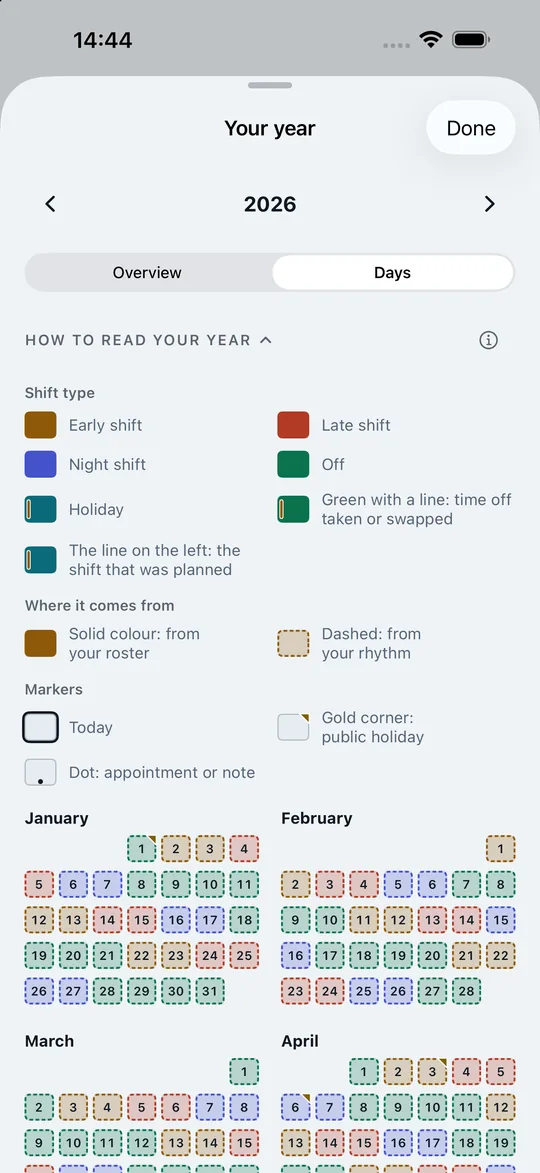
From 2-2-2-4 to your own cycle of up to 366 days – checked day by day against your real roster as soon as you’ve scanned one. Then you see the whole year – as a colourful overview of all twelve months, which you can also share as an image, or day by day. In October you already know whether you’re off at Easter. And if your workplace schedules away a day off, the Start screen tells you – with a button to put it straight into the pool.
-
07 · Account & holidays
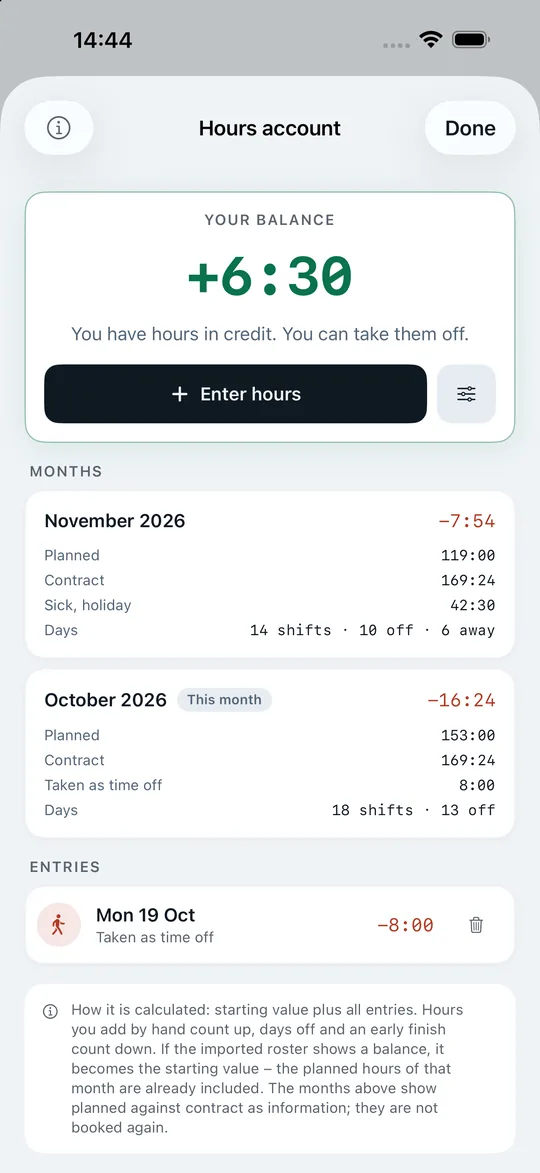
Hours account and public holidays under control.
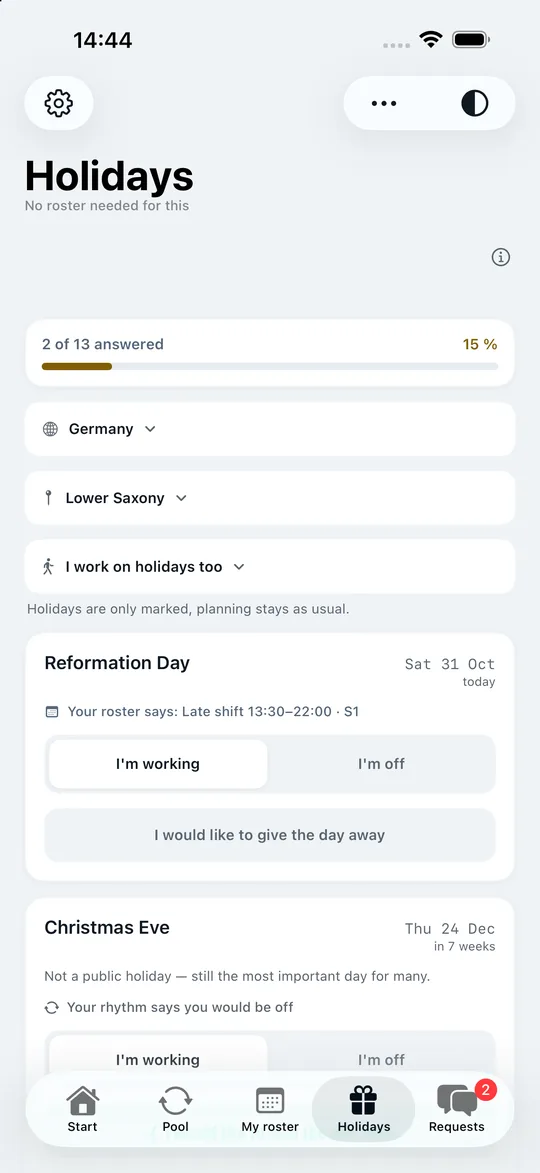
Time off in lieu, early finish, sick or holiday leave – calculated correctly, with the balance from your roster. And you settle Christmas Eve in the summer: working or off, swap or not.
-
08 · Lock Screen
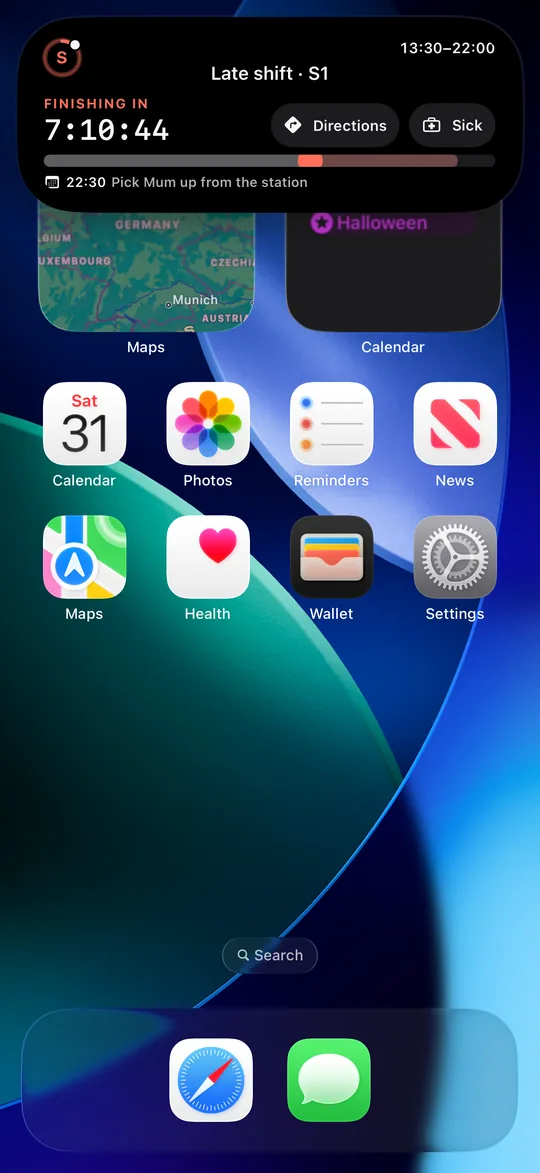
Without opening the app.
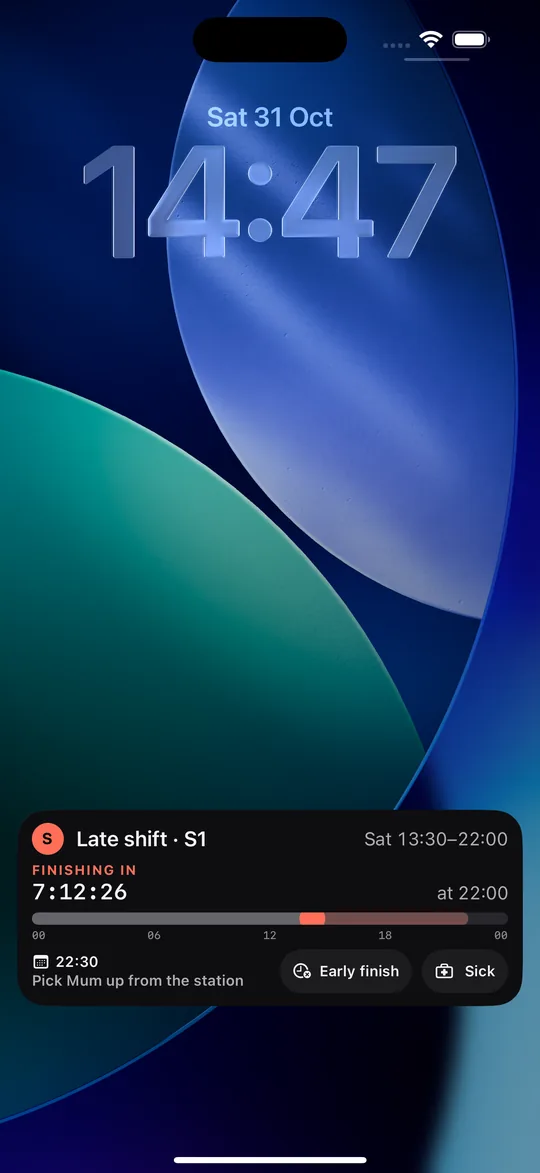
Before your shift starts, the Dynamic Island counts down; afterwards it shows the time until the end of your shift – with a ring around the shift letter that fills as the shift goes on. The Lock Screen also shows your next appointment and the “Sick” button, and during the shift “Early finish” too. If a swap is running, you see there whose turn it is. And widgets show your next shift and your week – with your appointments in them.
-
09 · That’s it
That was Shiftpool.
One pool, clear agreements and your whole roster – free, no sign-up, and nothing your employer has to set up.

16:00 — The difference
No contract, no works council, no rollout. You just start.
Swap features otherwise exist only in rostering software your employer has to buy and roll out. Shiftpool is built for you, the employees – the first person creates a group, the others join with a code.
| Feature | Group chat | Your employer’s software | Shiftpool |
|---|---|---|---|
| Who has to roll it out? | Nobody | Employer, with contract and works council | Nobody – you just start |
| Cost | Free | Licence per employee | Free |
| Overview of open shifts | Gets lost in the chat history | Yes | Yes, with filters and “Matches me” |
| Clear status of an agreement | “Maybe” isn’t a yes | Yes | Requested → Name shared → Agreed → Approved |
| Comparison with your roster | No | With the employer’s roster | With your roster, including rest time |
| Privacy | Phone number visible to everyone | Real name | Nickname – real name only if both agree |
| Approval | Phone call, often twice or not at all | In the software | As usual with the supervisor – the app records who calls |
Important: Shiftpool never changes your workplace’s roster. A swap is binding only once your supervisor has agreed – as before, by phone or in passing. The app only records who asks and what came of it.
18:00 — Privacy
Your roster is nobody’s business. So it stays with you.
The server gets what swapping needs. Plus – only if you’re in a group and have switched on “Notify me about new shifts” – the list of the days you are off or said you would like to work – dates only, without shifts or times. Switch the notifications off and the app deletes it. Exactly what is stored is listed below.
Trackers, ads, analytics
No analytics tool, no ad library, no selling of data. This website doesn’t set cookies either.
Roster, account, sick days, appointments
Your roster with shifts and times, your hours account, sick and holiday leave and your appointments are stored on your device. The text recognition when you snap a roster runs there too. One tap in Settings deletes the roster again. A backup in your own iCloud exists only if you expressly agree.
No email, no password
The app silently creates a random identifier. That’s all it needs.
Real names only between the two of you
You only see each other’s real names once you both share them for this one swap.
Data in Frankfurt
Offers, requests, chat, membership and – with notifications switched on – the days you are off or would like to work (the next 90, dates only, visible only to you) are stored in Frankfurt (Google Cloud, europe-west3). If you enter a shift group, the app shares your rhythm with it. Sign-in and notifications run through Google.
Delete your account in three taps
Settings, “Delete account”, confirm – and membership, offers, requests, chats, days off and the identifier are gone from the server. Only reports of violations remain, as the law allows. The full privacy policy (German)
21:15 — Who it’s for
Wherever work goes on around the clock.
Shiftpool knows your workplace’s own shift codes, long cycles and shift groups A to S. Built with a real annual shift roster from aviation security – made for every shift operation.
05:59 — In 20 seconds
Shiftpool in 20 seconds.
23:00 — FAQ
What you want to know first.
How much does Shiftpool cost?
Nothing. Shiftpool is free for employees, with no ads and no subscription.
Does my employer have to agree?
No. Shiftpool is a digital notice board by colleagues, for colleagues. There’s no interface to rostering software and no access for the workplace. Swaps happen as before, with your supervisor’s approval – the app doesn’t change any roster.
Do I need an account or an email address?
No. You just choose a nickname. The app signs in in the background with a random identifier – no email, no password, no phone number.
How do my colleagues join the group?
The first person creates the group, for example “Ward 3B”. After that, every member brings colleagues in with a personal code – or prints a notice with a QR code for the notice board, valid for up to 30 days. Anyone who knows the group can also search for it and ask to join. The whole group sees new members for a week; anyone who doesn’t belong is removed by two votes (one is enough in a group of two).
What if I’m the first?
Then you create the group and are briefly alone in the pool. Send the invitation code to two or three colleagues or put up the notice – even with three people the first swap works. Until then, roster, year overview and hours account are yours to use on your own.
Can I use the app without colleagues?
Yes. Roster scanning, shift rhythm, year overview, hours account, public holidays, appointments and widgets all work on your own – with no group at all. Only swapping needs colleagues in your group.
Can I add private appointments too?
Yes. Dentist, parents’ evening, birthday: one tap on “Appointment” on the Start screen or on a day in “My roster” is enough. The entry sits next to your shift, with a place and “Directions”, weekly or monthly if you like, and with a reminder as an alarm. Without a time it becomes a note. Connect your iPhone’s calendar and its events appear in Shiftpool too – the app spots duplicates. None of this reaches our server.
Is there Shiftpool for Android?
Not yet. The iPhone app comes first; an Android app is planned after that – on the same server, so iPhone and Android users can swap in the same group.
Your next swap takes three taps.
Get the app, create the group for your ward and send the code to two colleagues. From then on the pool fills itself – and your roster, your year and your hours account work from day one, even on your own.
Free download – for iPhone with iOS 17 or later.