Your shift calendar. For the whole year, starting today.
A doctor’s appointment in March, a wedding in June, holiday in autumn: with your shift rhythm, Shiftpool already knows today when you are working – even for months that have no roster yet.

Why a rhythm does more than a calendar
Most shift calendar apps are calendars you type every shift into by hand. That is tedious – and you still know nothing about next year. Yet almost every shift workplace runs on a fixed cycle: “2 early, 2 late, 2 night, 4 off”, or a year plan that starts over after three weeks.
Shiftpool stores exactly that cycle. From it, the app works out every day – forwards and backwards, across the turn of the year. The cycle runs on, just as shift calendars are carried forward in workplaces. What changes on 1 January is usually the pattern; for that, a rhythm can apply from a certain day and be replaced by a new one.
Four ways to your rhythm
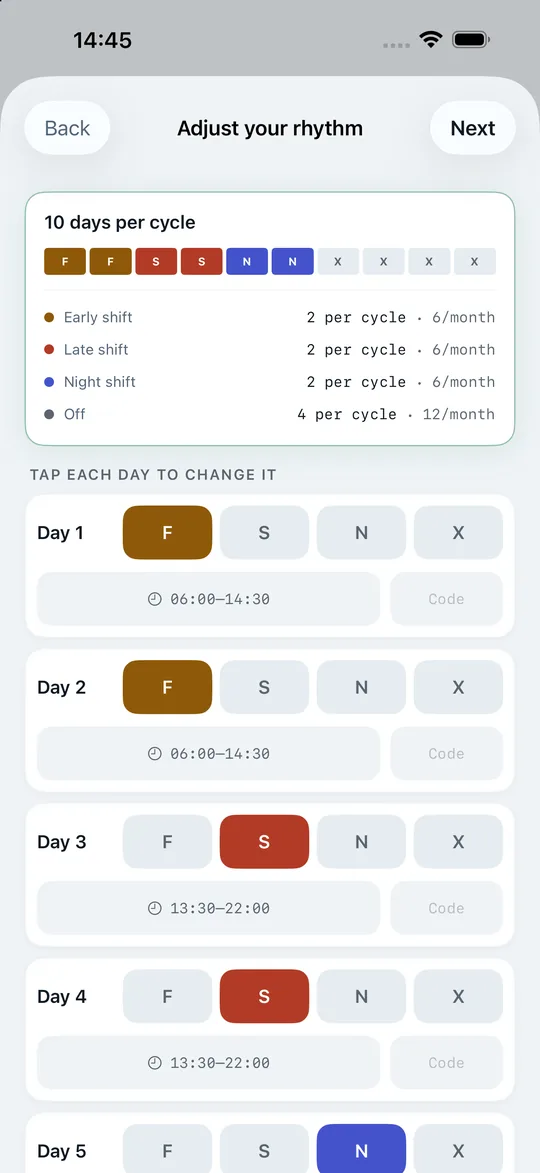
- Take it over from your shift group. If a colleague from group “B” has already entered the rhythm, you take it over with one tap. After scanning your roster, the app even recognises by itself which group your roster matches and suggests it. Whoever enters it first sets it – nobody else can overwrite it.
- Recognise it from your roster. Given enough roster days, the app finds the pattern itself.
- Type in the year plan. One tap per day off, the way you read it off the notice board. A single month is enough for most cycles.
- From a template – or day by day yourself.
The alignment is proven, not guessed
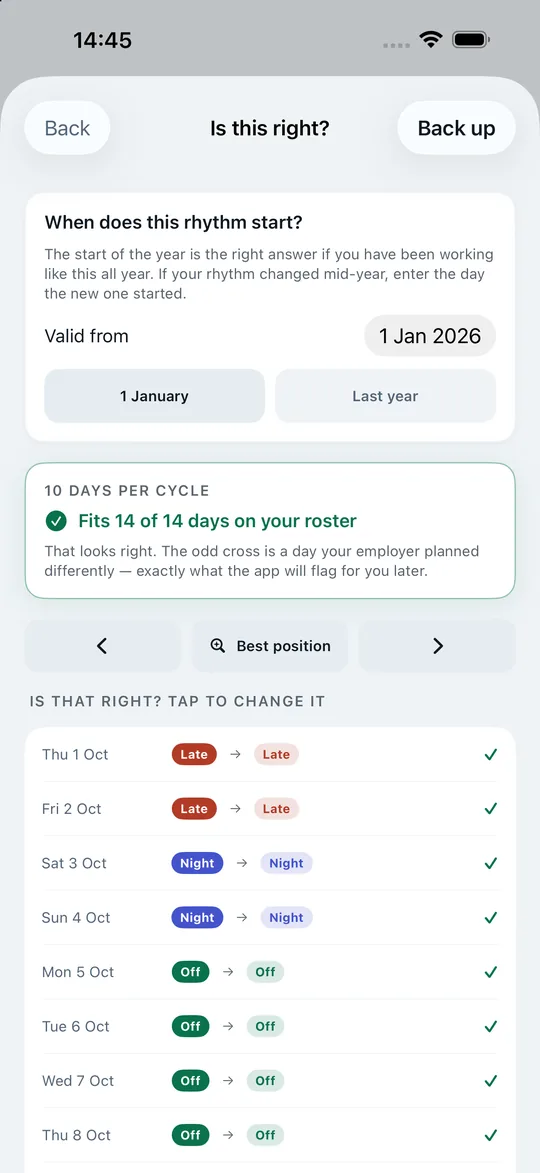
A rhythm is only as good as its alignment: is today day 1 or day 7 of the cycle? Get that wrong and you have a calendar that is quietly off. So Shiftpool tries every alignment against your real roster and shows the result day by day, side by side – rhythm against roster, with ticks and crosses. You see a wrong alignment before it does any harm.
The whole year at a glance
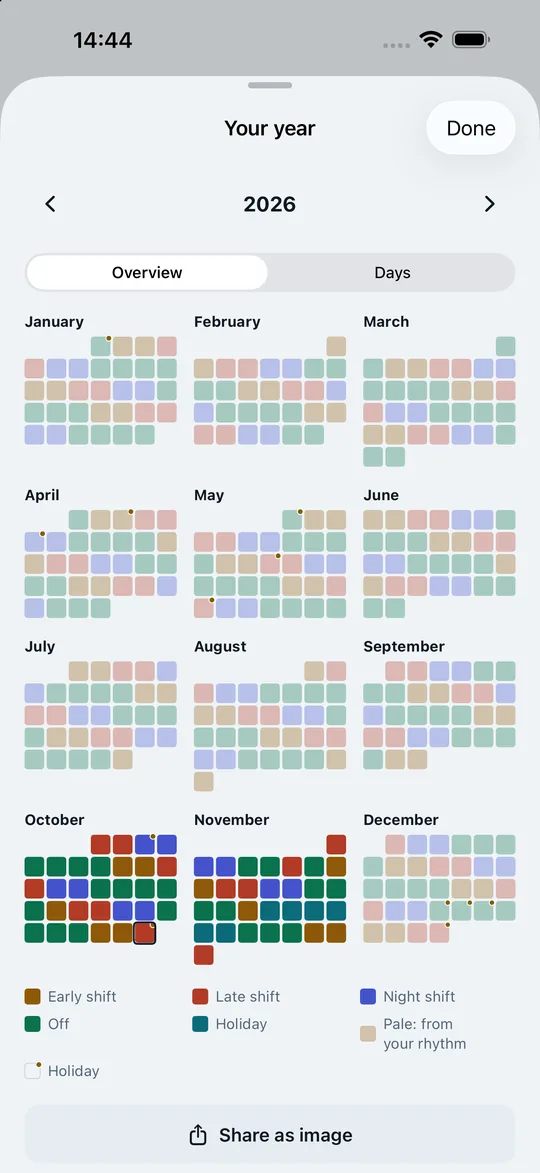
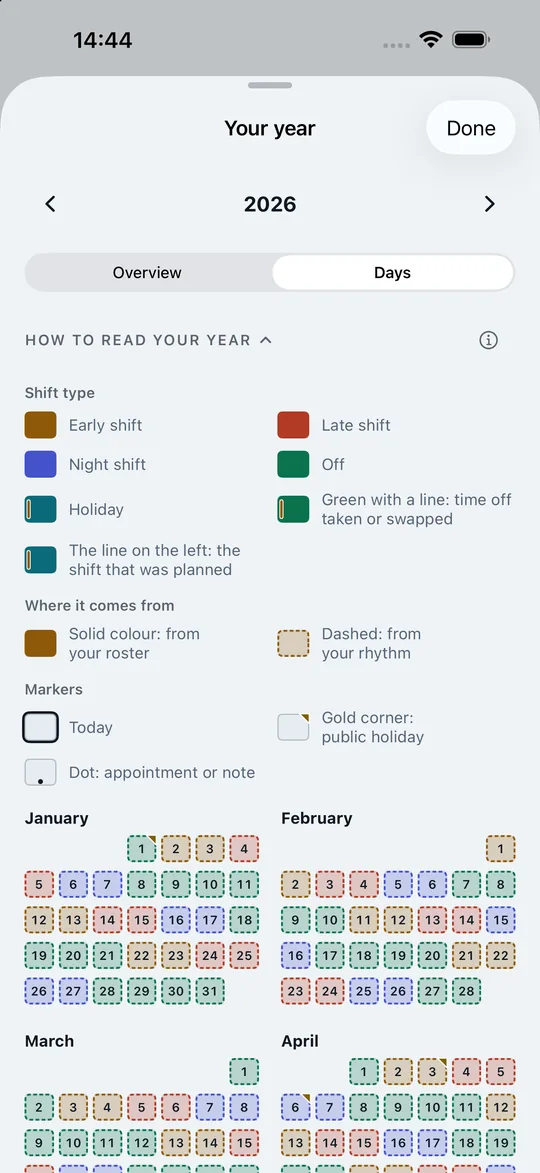
“Your year” has two views at the top. The Overview shows all twelve months on one page, every day as a coloured square: bold for what comes from the roster, pale for what the rhythm predicts, holiday leave in turquoise, public holidays with a gold dot, today with a ring. Tap a month to open it in “My roster”. Under Days, every day is listed with its date.
“Share as image” sends the overview to family or partner – always in light mode, without names and without your group. Sick days appear in the picture only as “away”.
Supported shift patterns
| Pattern | Cycle | Typical for |
|---|---|---|
| Monday to Friday | 7 days | Day shift, administration, fixed hours |
| 2-2-2-4 | 10 days | Manufacturing, healthcare, control rooms |
| 3-3 / 4-2 / 6-4 | 6–10 days | Rotating shifts in production and logistics |
| Panama / Pitman (2-2-3) | 14 days | 12-hour shifts, round-the-clock operations |
| DuPont | 28 days | Chemicals, power plants, 12-hour shifts |
| 4 on, 4 off | 8 days | Security services, 12-hour shifts |
| 24/48 and Kelly | 3 or 9 days | Fire services, 24-hour watches |
| Year plan with groups | up to 366 days | Airports, police, workplaces with groups A, B, C … |
More on the individual patterns, their pros and cons: Shift patterns explained.
When the roster arrives: the comparison
Once the app knows your rhythm, it sees with every new roster what your workplace has planned differently – and shows it separately:
- Day off scheduled away – off according to the rhythm, working in the roster. The best candidate for the pool, and exactly the one the app suggests.
- Shift type changed – late instead of early.
- Working day became a day off – extra time off.
A rhythm from the year plan often only knows “on or off”; the times only come with the monthly roster. Then the app compares just that – and does not flag every other day as “changed”.
Sharing with your shift group
All the groups at a workplace usually run through the same cycle, just offset. If one person enters the rhythm for group “B” correctly, everyone in group “B” has it: in the app under “Take over your shift group’s rhythm” – each group shows how well it matches your roster – or as a link you pass on. The link contains only the pattern, alignment and times – no name, no group, no workplace. Whoever opens it sees the comparison with their own roster before taking it over.
Private appointments in the shift calendar
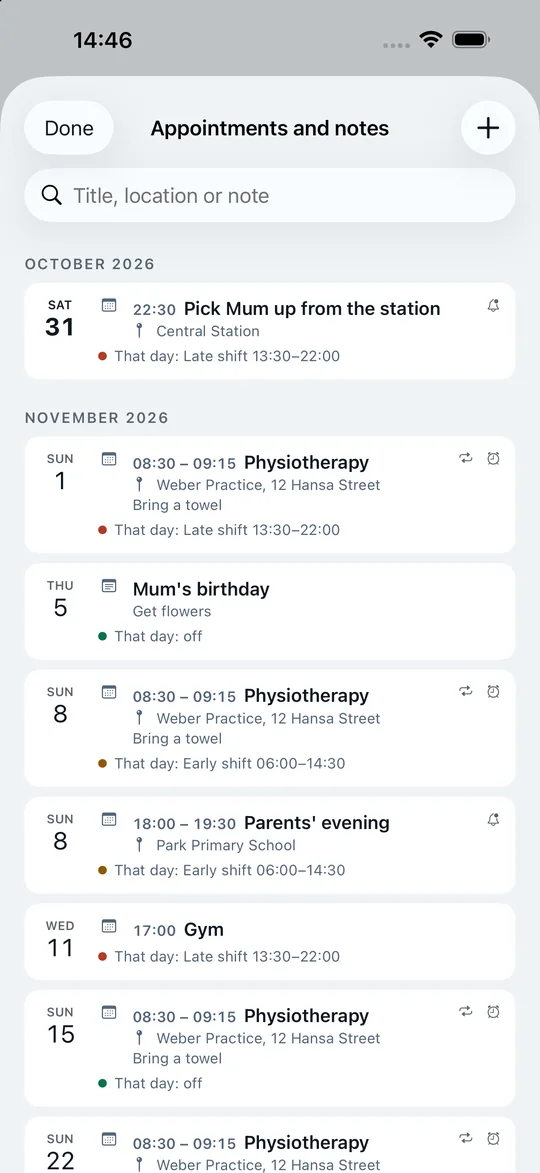
The doctor’s appointment, the parents’ evening, your mother’s birthday: all of that belongs next to your shifts. In Shiftpool you enter appointments and notes right on the day, on the Start screen or in “My roster” – with a place, “Get directions” and, if you like, every week, every two weeks or every month. In the list of all appointments, each entry shows what you are working that day; if an appointment clashes with your shift, the app tells you as you enter it. In the year overview, the day carries a dot.
Connected to your iPhone calendar: its events then appear in Shiftpool too, and new appointments from Shiftpool go into it – no more jumping between two apps. If the same appointment is in both, the app recognises it and merges them. If you like, it writes your shifts into a separate calendar, “Shiftpool – Shifts”; share it and your family sees when you work. Sick or holiday leave never appears there.
If you want, the app reminds you – as an alarm that rings even in silent mode from iOS 26, or as a notification. Appointments never go to our server, and your colleagues do not see them.
Frequently asked questions about the shift calendar
Can I use the shift calendar without a roster?
Yes. The rhythm alone is enough to see the whole year. Days without a roster appear dashed – so it stays clear what your workplace has planned and what the app predicts.
How long can my shift cycle be?
Up to 366 days. That covers 8-week police patterns as well as 15- and 23-week patterns from industry. From 15 days, you edit the cycle as a weekly grid.
What if my rhythm changes at the turn of the year?
Enter the new rhythm with a start date. The old one applies until then, the new one after. If one is deleted, the previous one simply carries on.
Are public holidays shown in the shift calendar?
Yes, the public holidays of your German state (or one of 20 more countries) are marked in gold in your roster and in the year overview. If you are off on public holidays, you can have them kept free when planning ahead.
Your next swap takes three taps.
Get the app, create the group for your ward and send the code to two colleagues. From then on the pool fills itself – and your roster, your year and your hours account work from day one, even on your own.
Free download – for iPhone with iOS 17 or later.