Your hours account. Finally transparent.
How many hours are you in credit? Can you take next Friday off in lieu? What comes off when your shift ends at 16:00 instead of 20:00? Shiftpool keeps your hours account alongside your roster – and shows you every entry.

How Shiftpool calculates
The formula is deliberately simple so you can check it yourself at any time:
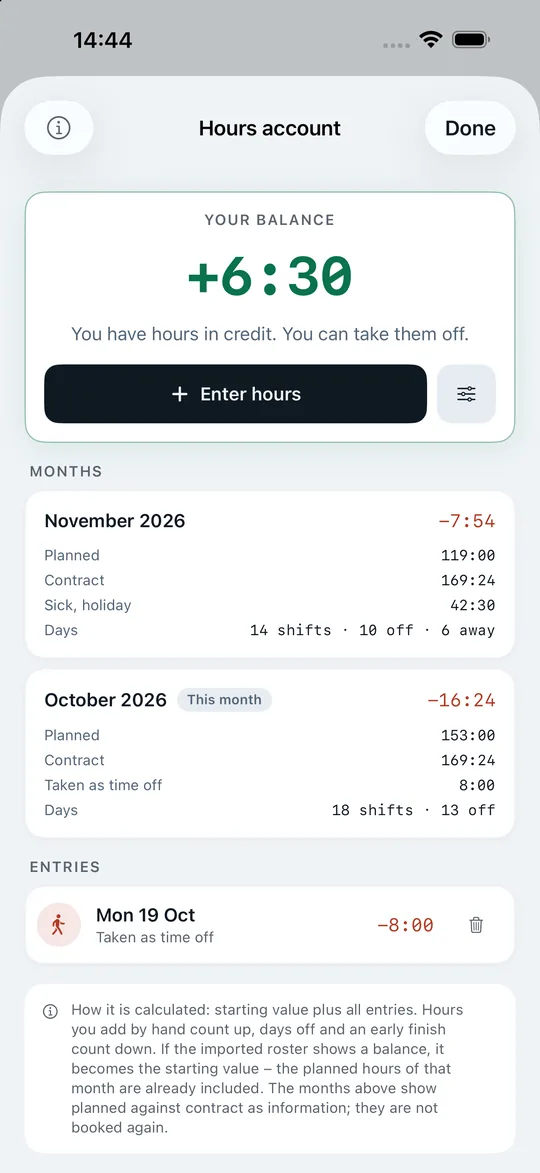
Balance = starting value + all entries
The app takes the starting value from the closing line of your roster. Rostering software usually calculates it like this: previous month’s balance + scheduled hours − contract hours. −42:06 + 145:30 − 140:00, for example, becomes a balance of −36:36. Exactly this value is your new starting value; old import entries are dropped so nothing counts twice.
Entries are everything that happens afterwards: hours you add by hand count as plus, days taken off in lieu and an early finish come off. The monthly cards “scheduled vs. contract” are for information – they are not booked a second time.
Every workplace calls it something different. The name and short form are yours to choose: hours account (AZK), flexitime account, time account, hours balance.
Time off in lieu with one tap
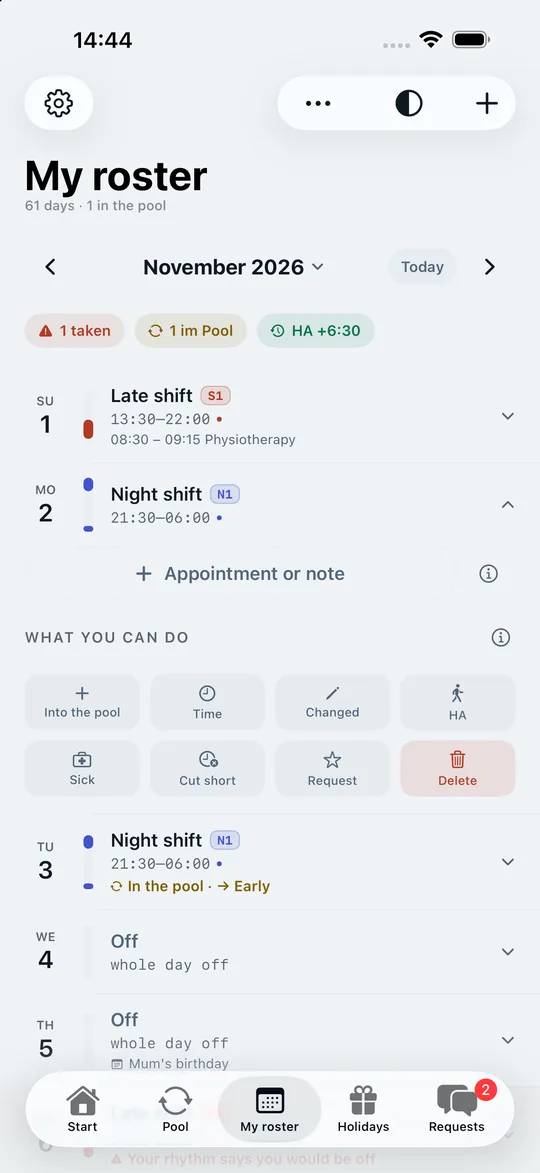
In “My roster”, every working day has a button with the short form of your account. One tap makes the day free and deducts the hours of the shift – the suggested value is the actual working time, and you can change it. It works across several days too: from–to, only working days are deducted, days off stay as they are. The scheduled shift remains visible underneath; undo the time off in lieu and everything is back as it was.
Early finish and cut-short shifts
More common than a whole day off: “I’m leaving at 18:00 today instead of 20:00” – or your workplace sends everyone home at 16:00. Both are the same thing: the day ended early, but you still worked. Shiftpool records when you finished and why: time off in lieu, shift cut short, fell ill, or another reason.
Whether the missing hours come off your account is something the app asks explicitly every time – with no preselection. Every workplace handles a cut-short shift differently, and guessing would be wrong here. Only for time off in lieu is the answer clear.
Everything else depends on it: the “next shift” on the Start screen and in the widget moves on to tomorrow from your actual finishing time, and your hours worked are correct.
Sick and holiday leave
Sick, holiday or another reason can be entered for a single day or a period – with a start and end of your choosing. These days count as worked and are not deducted from your account. In your roster they appear in colour (holiday turquoise, sick berry), and the scheduled shift stays struck through next to them so your rhythm remains visible.
The reason stays in the app: when you are sick, the widget only says a neutral “No shift today”, and the reason never goes to the server.
What the account is not
Shiftpool does not replace your workplace’s time recording. What counts is what your employer settles. The app helps you keep an overview and notice discrepancies early – for example, when the balance on your next printout does not match what you expect.
More background: Calculating your hours account – how to read your hours balance.
Frequently asked questions about the hours account
Where does the balance in the app come from?
If it is on your roster, Shiftpool takes it over automatically as the starting value when importing. Otherwise you enter it once by hand and can overwrite it at any time.
Are sick days and holiday deducted from the account?
No. They count as worked. In the monthly calculation they count towards the scheduled hours and appear separately as “away”.
Can I undo an entry?
Yes. Every entry can be deleted; if you undo the time off in lieu on the day, the entry disappears too and the shift is back – with type, shift code and time.
Your next swap takes three taps.
Get the app, create the group for your ward and send the code to two colleagues. From then on the pool fills itself – and your roster, your year and your hours account work from day one, even on your own.
Free download – for iPhone with iOS 17 or later.