
- Light and dark mode – in the dark, true black that saves power on the OLED display.
- Accessible: Dynamic Type, VoiceOver, contrast above 4.5 : 1, reduced motion.
- Works offline too: your roster, your account and the last loaded pool are always there. Whatever you offer or write without reception, the app sends as soon as it is back online.
- German and English, date and time in your iPhone’s format, the first day of the week for your region.
- Your workplace’s time zone: if you fly to Dubai, your roster is not shifted by hours.
- iCloud backup only with your consent – after reinstalling or on a new iPhone, everything is back.
- New iPhone: your group and ongoing swaps move with you via iCloud Keychain – no sign-in needed. Your offers in the pool come back with the iCloud backup.
- Explanations on the spot: an “i” in every area explains every symbol and every button.
- The introduction, any time again: on first launch, Shiftpool shows what it is about in five screens. Under Settings → Help you can start it again with “Watch the introduction” – all the explanations are there too.
A tour of the app
Everything you need on shift. In one app.
Shiftpool starts with your own roster and ends with an approved swap. Just keep scrolling: the iPhone stays put and shows you each area as it will look in your hand later – with made-up sample data from a ward that does not exist. One thing first: the pool lives on your colleagues. How to bring them in within three minutes is under Group & invitation – or start right there.
1 of 12
-
01 · Shift exchange
The pool: the notice board that never gets plastered over
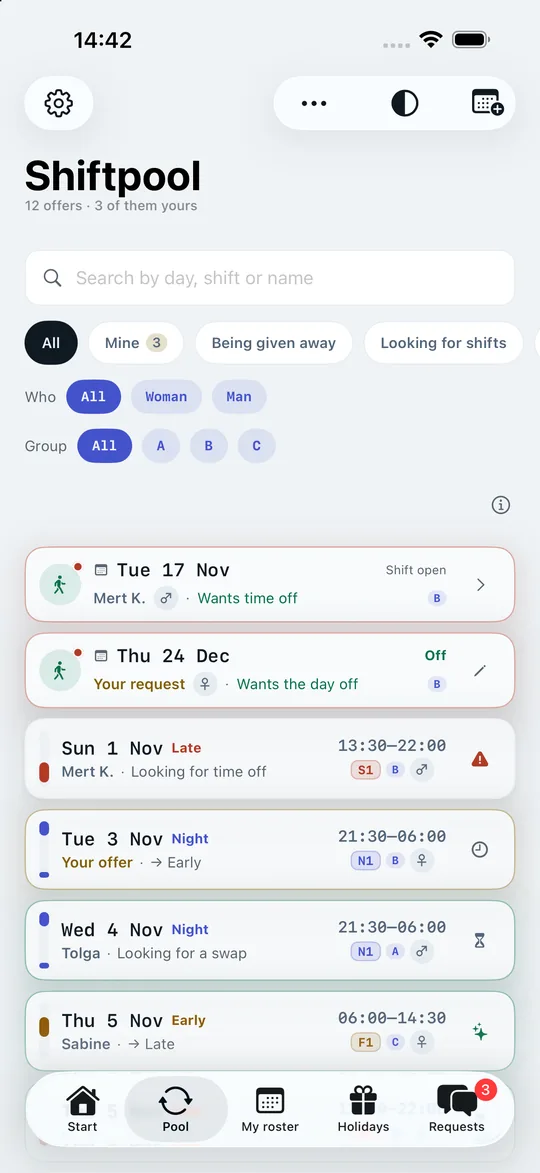
The pool lists every open shift in your group exactly once: day, time, your workplace’s shift code, who is offering and what they want in return. The shift band on the left edge shows at a glance whether it is an early, late or night shift.
- Three kinds of offer: “Giving away”, “Looking for shifts” and requested days off (“Wants time off”) – even months ahead, before the roster even exists.
- Requested days off with a reminder: enter Christmas Eve in July, as a single day, a period or recurring. When the roster arrives, the Start screen tells you whether your wish came true – or offers to put the shift straight into the pool. “My requested days off” shows every request with its status.
- Filters for large groups: search by day or name, kind of offer, shift group (A, B, C …) and – where it matters, such as same-gender security checks – woman or man.
- “Matches me”: shows only offers on days you are off according to your roster or rhythm.
- Urgent marks who really needs help – without anyone having to explain their reasons.
- Notifications when a colleague gives away a shift on a day you are off according to your roster or rhythm, or on a day you would like to work – and only for the shift types you are looking for. If you only take early shifts, a night shift will not wake you.
-
02 · Before you say yes
Does it fit me? The answer is right at the top
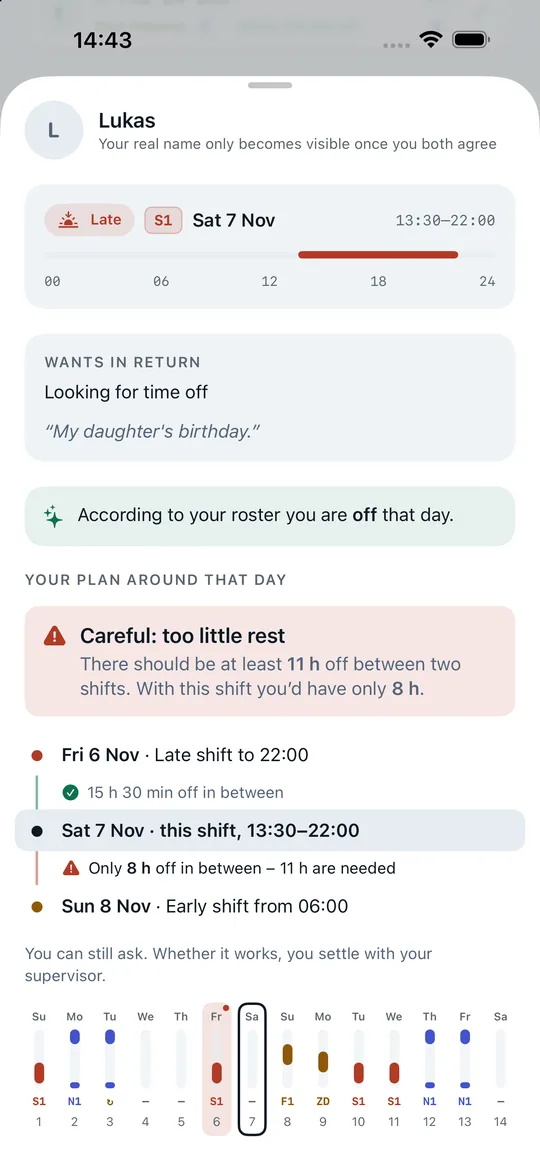
Tap an offer and Shiftpool first answers the one question that counts – in a single sentence: “Fits – you have enough time off”, “Careful: too little rest” or “Won’t work: the shifts overlap”. Below it you see the chain from your own roster: the day before, the free time in between, this shift, the free time after it, the day after.
- Less than eleven hours off between two shifts and the app warns you – likewise from the seventh working day in a row.
- Without a time it does not guess but says “Check it yourself”.
- Plus two weeks of your roster with the offer day in the middle – and a tip about the whole year.
This is a hint, not a block: some collective agreements allow exceptions, and what works in your case is your supervisor’s call. What Germany’s Working Hours Act says about rest time
-
03 · Swapping, just the two of you
One request, one chat, one clear status
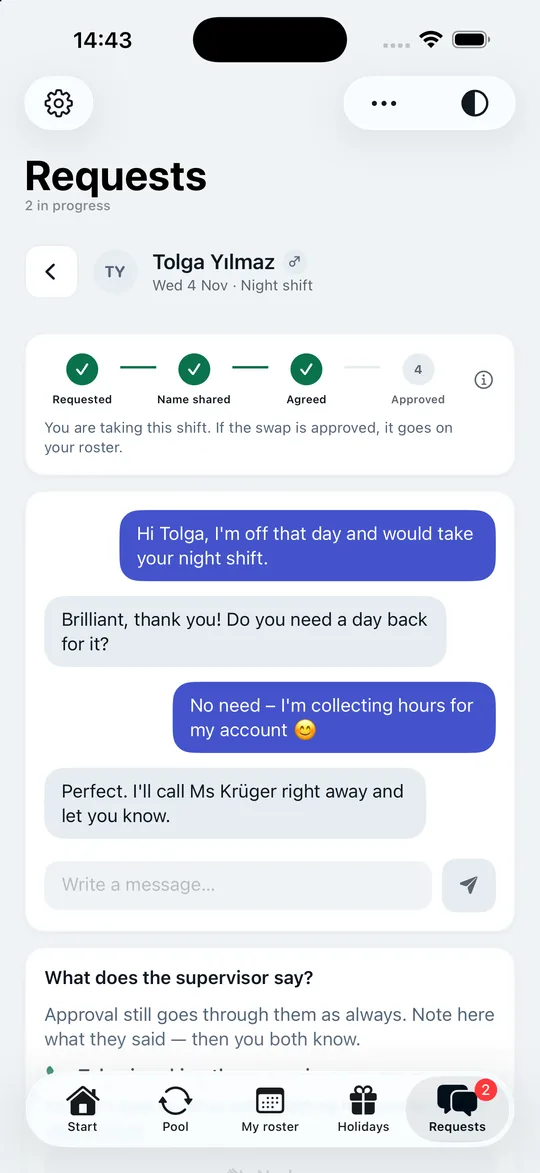
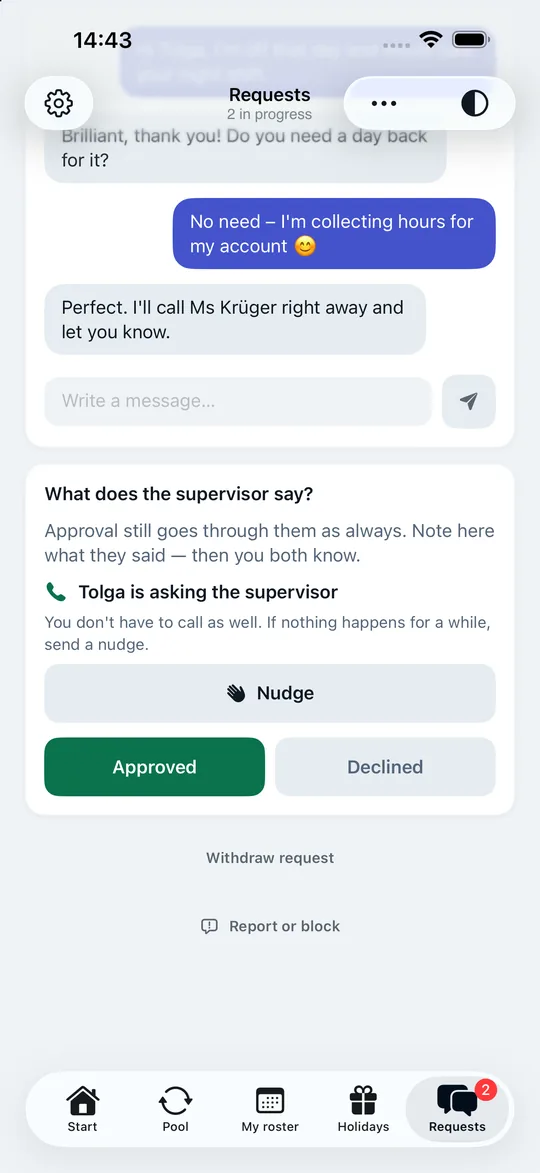
Every swap goes through four visible steps: Requested → Names shared → Agreed → Approved. “Agreed” only appears once both of you have tapped “I agree”. So nobody thinks it is settled when only one person has said yes.
- Chat only inside the request – no group chat, no open chat. Report and block are built into every conversation; if a message contains offensive words, the app asks once whether you really want to send it like that.
- Real names only when both share them: you see each other under nicknames. You share your real name for this one swap – and it only becomes visible once the other person shares theirs too.
- Nudge when things stall – at most every six hours, so the button does not turn into a flood of pings.
-
04 · After approval
The swap lands in your roster – when you tap
“I’ll ask the supervisor”: the app records who makes the call. So it is neither nobody – nor both of you. Once a swap is approved, every other request on the same offer closes automatically: taken is taken.
Whoever taps “Approved” sees their roster change at once; the other person gets “Take over onto my roster” – nobody’s roster is rewritten behind their back. If you give a shift away, the day shows as off afterwards, with the original shift still visible, crossed out. If you take one on, you get the shift with its code and time. If a swap still falls through, the app tells you immediately – even through a Focus mode.
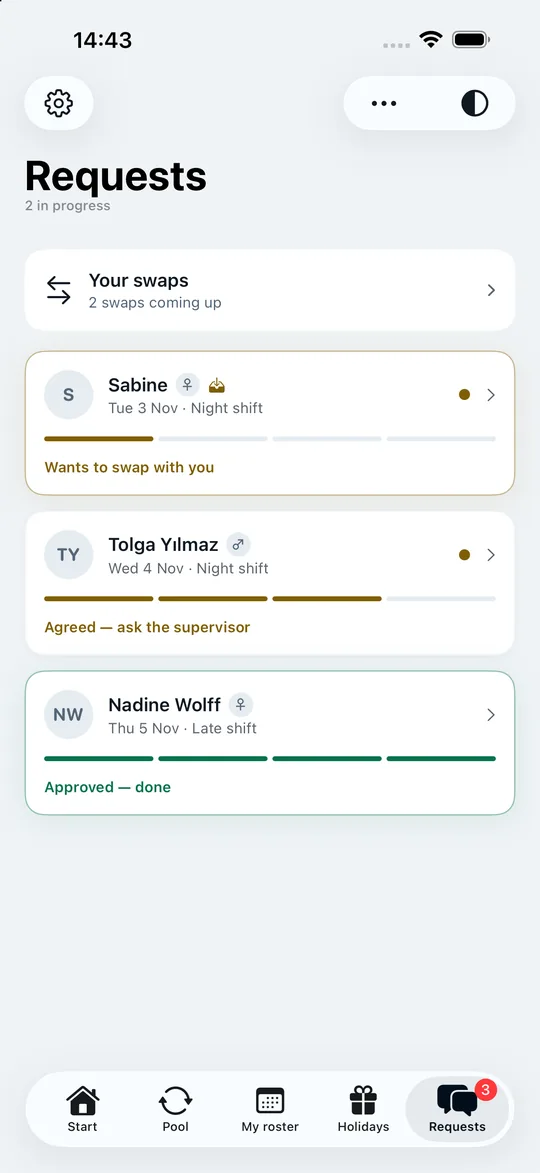
“Your swaps” collects every swap from “Agreed” onwards – even months later, when the Christmas swap from October would long be forgotten.
-
05 · My roster
Every day with everything that can happen
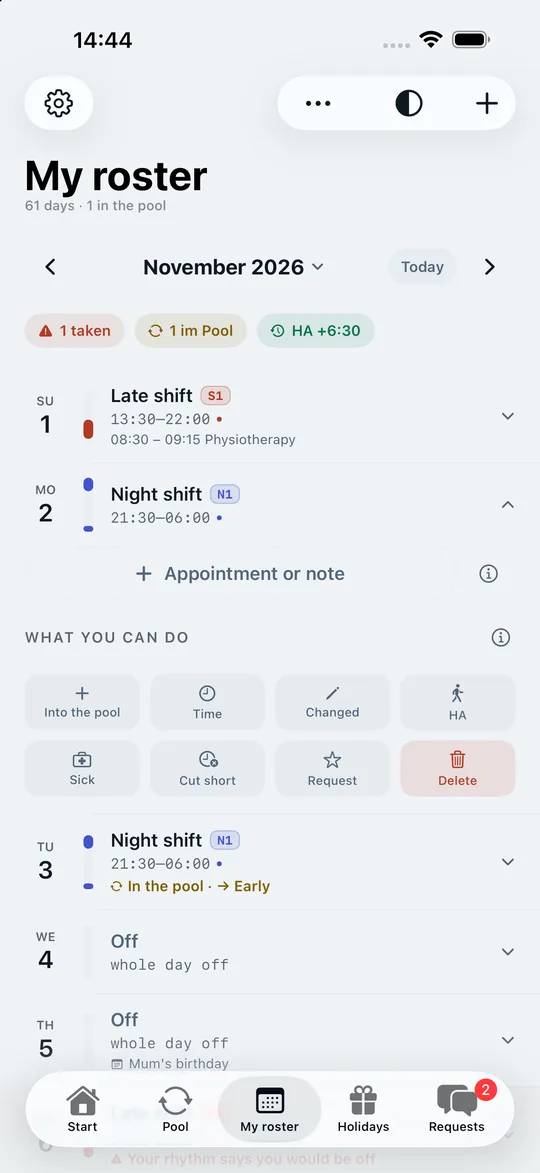
“My roster” shows your month day by day, with the real time, shift code and shift band. One tap opens the row of buttons for everything that actually happens on shift – and every action can be undone.
- Changed – the phone rings and early becomes late. The old state is remembered and comes back with one tap.
- Time – at the airport the early shift starts at four on Mondays and at six on Tuesdays. Every day has its own time.
- Sick, holiday leave, cut short, early finish – sick and holiday leave from–to across several days, cut short and early finish for the one day. The planned shift stays visible underneath. You can enter holiday leave for months that have no roster yet.
- Time off in lieu from your hours account, Requested day off, Into the pool and your own appointments right on the day.
-
06 · Scan your roster
Photo, screenshot, PDF or by hand
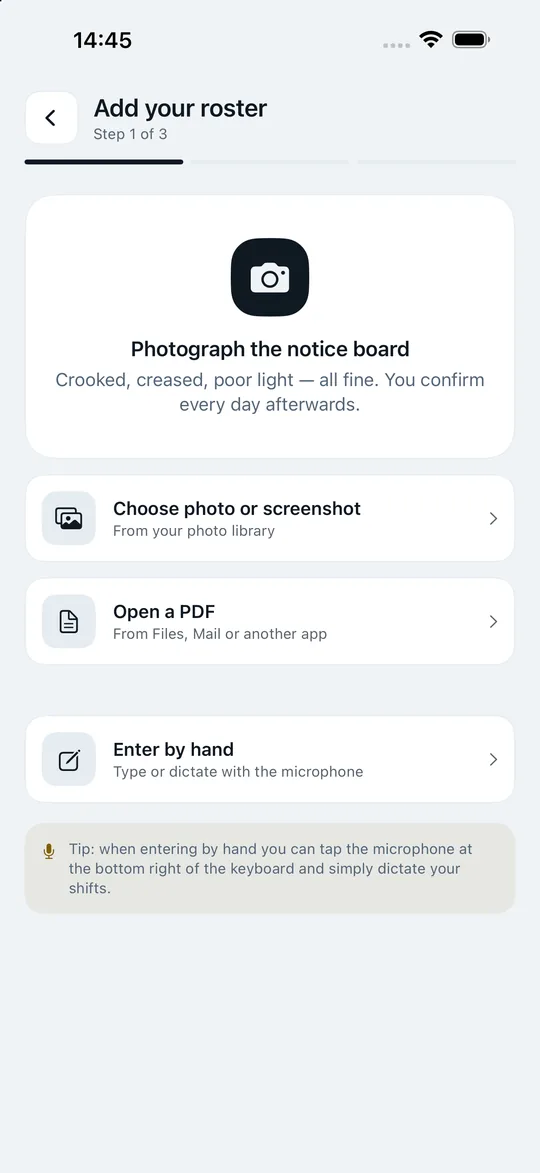
Four routes to the same goal: Shiftpool recognises date, shift code, start, end and break, even reads your contracted hours and account balance from the summary line – and shows you every day to confirm. Recognition runs with Apple Vision entirely on your iPhone.
- One line per day: date, shift, time, shift code. Days recognised with uncertainty are marked; “Looks right” confirms them and jumps to the next.
- Holiday or sick? If the roster shows longer stretches off or codes like “U”, the app asks – one tap enters holiday leave, sick leave or time off in lieu for the whole stretch.
- Your shift group recognised: if your roster matches the rhythm a colleague has entered for their group, the app suggests it to you.
- An older roster leaves your account balance alone – the newest one always counts.
When entering by hand, you can simply dictate your shifts: “Monday early shift, Tuesday off”.
How roster scanning works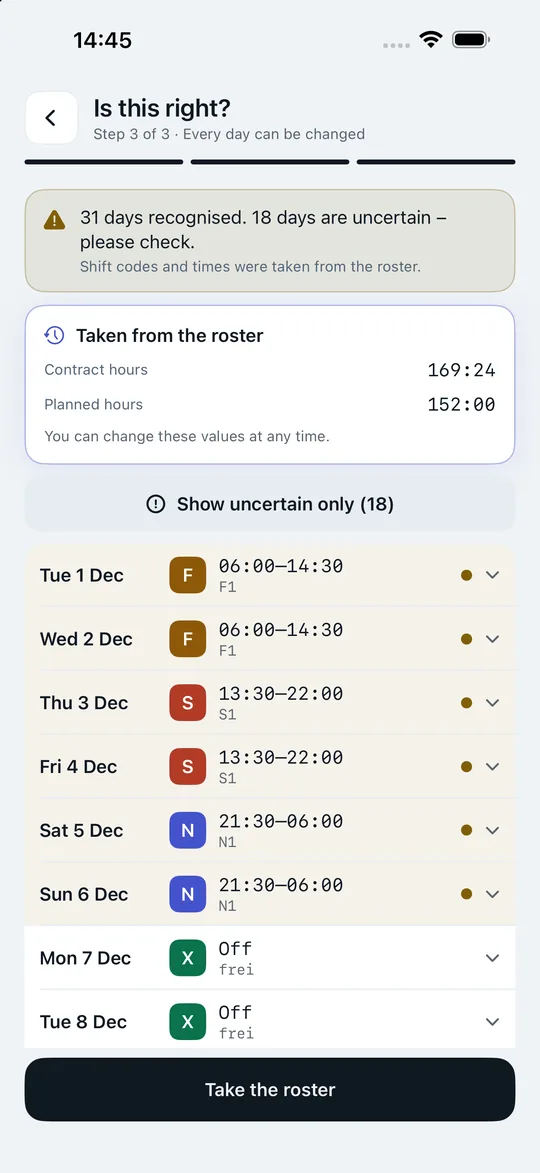
-
07 · Rhythm & year
Your shift calendar for the whole year
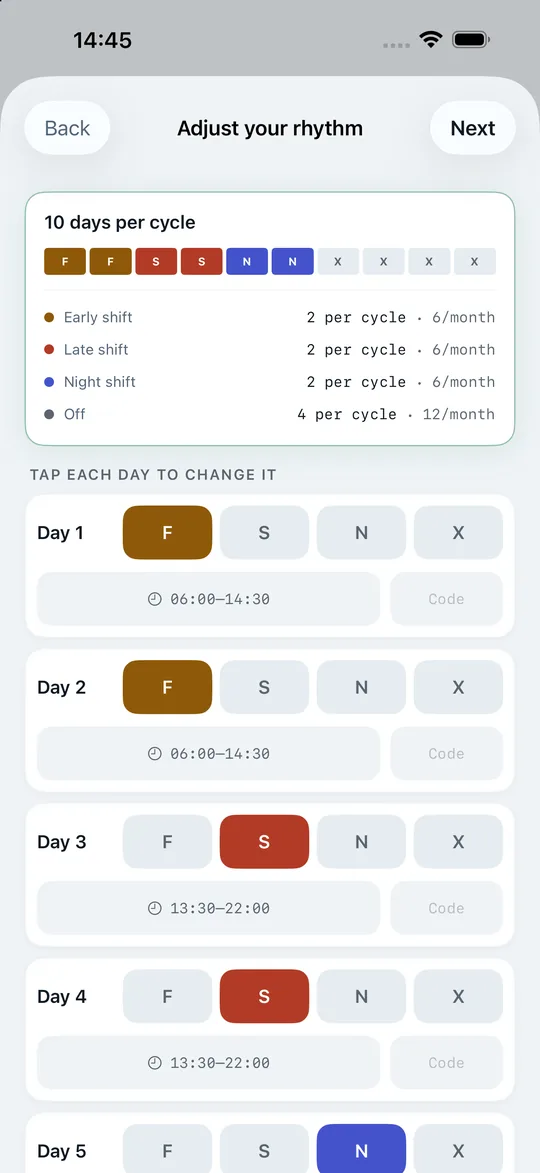
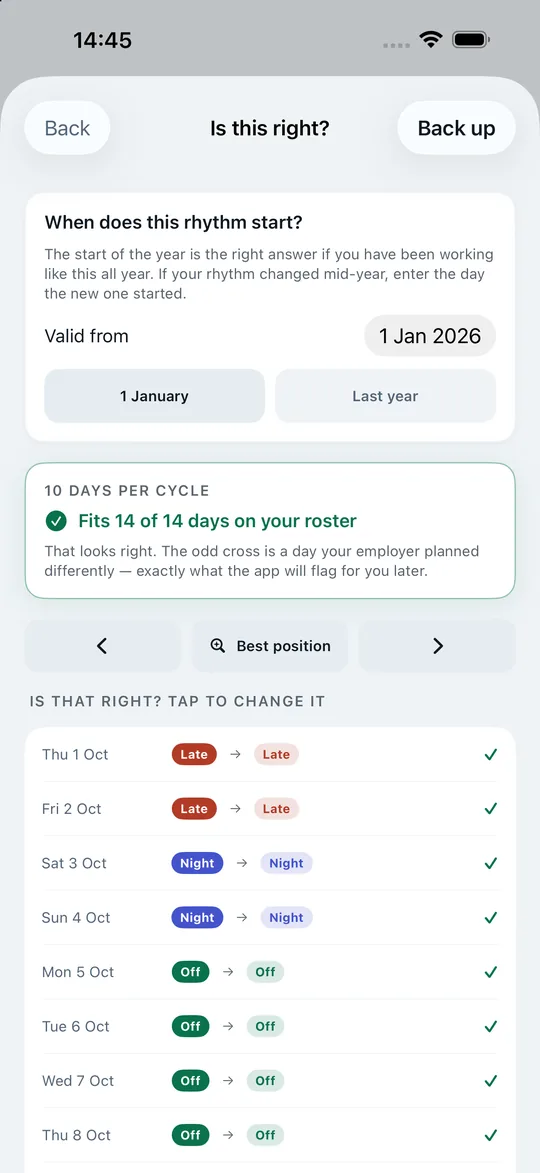
Enter your rhythm once – from a template, recognised from your roster, taken over from a colleague in your shift group or received as a link. For every group, the app shows you how well it matches your roster. If you have already scanned a roster, Shiftpool proves the alignment day by day with ticks and crosses against your real roster before anything is saved.
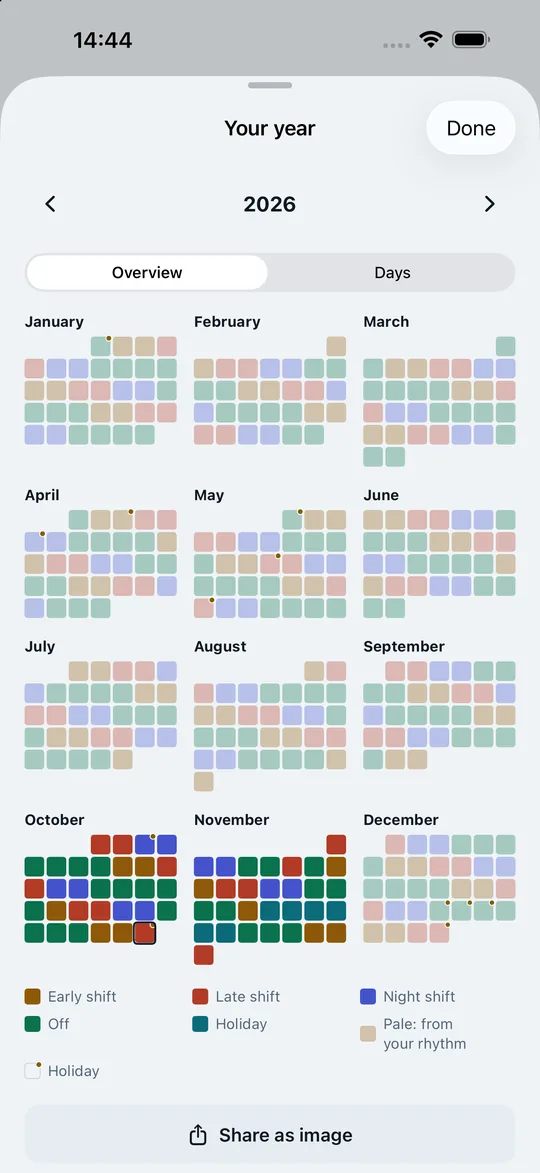
Then you see the whole year – in two ways, switchable at the top: the Overview shows all twelve months at a glance, every day as a coloured square, bold from the roster, pale from the rhythm, holiday leave in turquoise, public holidays with a gold dot. “Share as image” sends it to your family – without names, and sick days appear only as “away”. Under Days, every day is listed with its date, dashed where the rhythm predicts it, plus appointments.
More about the shift calendar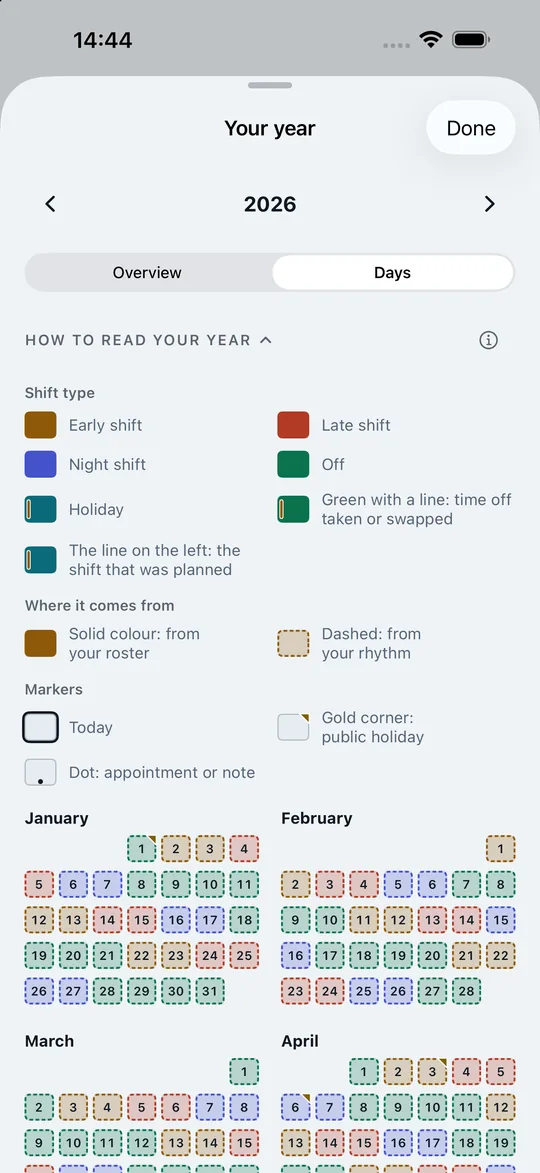
-
08 · Appointments & calendar
Dentist, parents’ evening, birthday – right next to your shifts
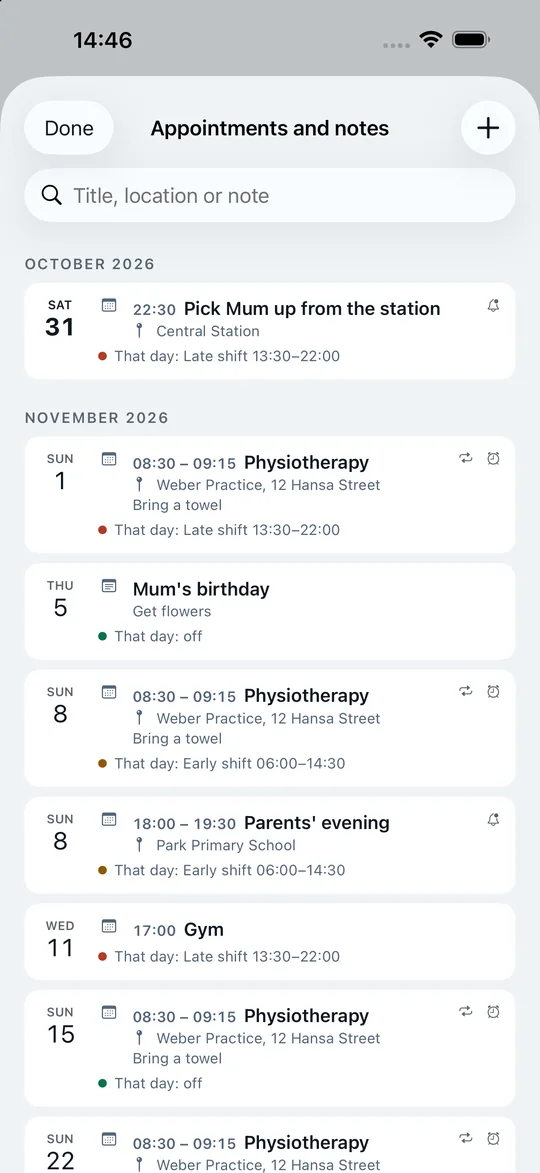
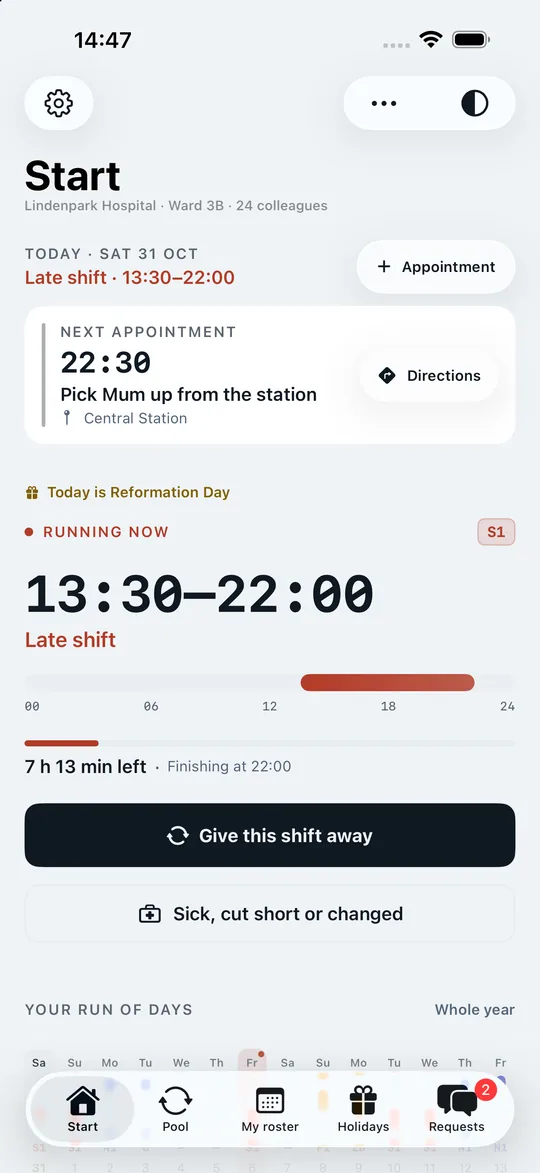
If you work shifts, you plan your private life around the roster. On the Start screen, “Appointment” sits right next to today; in “My roster” every day has an “Appointment or note” button. With a time, the entry is an appointment; without one, it is a note – “buy flowers” on your mother’s birthday.
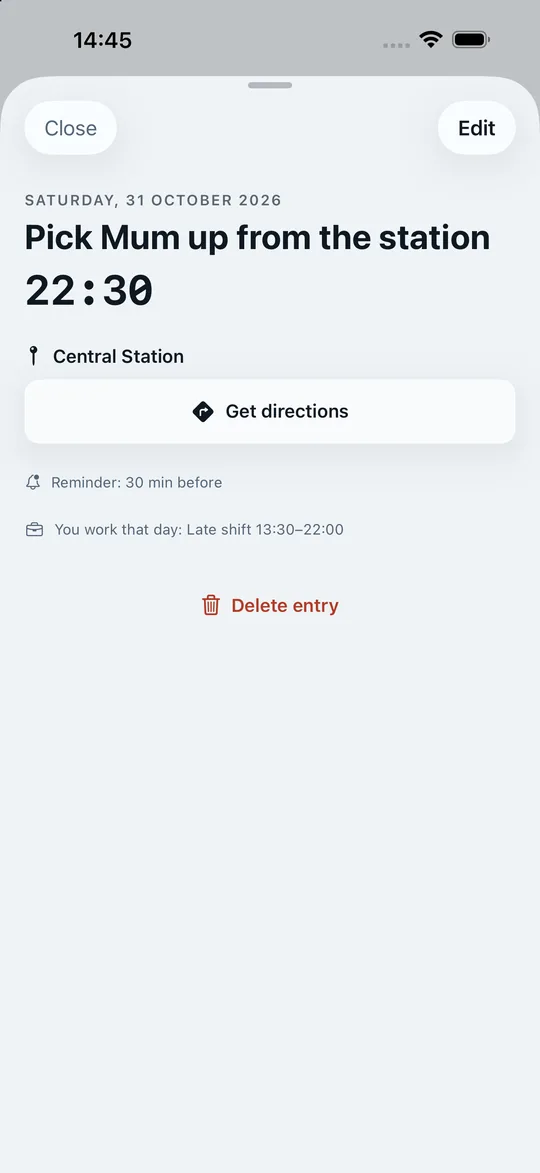
- With a place and directions: enter the address and “Get directions” opens Apple Maps – or Google Maps, if it is on your iPhone. The Start screen shows your next appointment large, with “Get directions” beside it.
- Your shift sits beside it: if an appointment clashes with your shift, the app tells you as you enter it. In the list of all appointments you see, for each one, what you are working that day.
- Recurring: every week, every two weeks or every month. When editing or deleting, you choose “Only this appointment” or “This and all following”.
- With your iPhone calendar: connect it and its events appear in Shiftpool too, while new appointments from Shiftpool go into it – except those with an alarm, which only Shiftpool can ring. Duplicates are spotted and merged. If you like, the app creates the calendar “Shiftpool – Shifts” – share it and your family sees when you work. Sick or holiday leave never appears there.
- Reminder as an alarm: rings loud, even in silent mode, until you turn it off – with snooze after nine minutes (from iOS 26, otherwise as a notification). The app tells you beforehand, to the minute, when it will ring.
- Visible everywhere: as a dot on the day in the year view, in the widgets and, on days with a shift, even in the Dynamic Island.
- Never on our server: appointments and notes stay on your iPhone – and, if you connect it, in your iPhone calendar. Your colleagues do not see them.
-
09 · Hours account
Plus, minus, time off in lieu – calculated properly
Shiftpool takes your balance straight from your roster. Days taken off in lieu, an early finish or a shift cut short are booked – for a shift cut short, the app asks explicitly whether the hours come off your account. Name and short form are up to you: hours account, flexitime account, overtime account.
Hours account in detail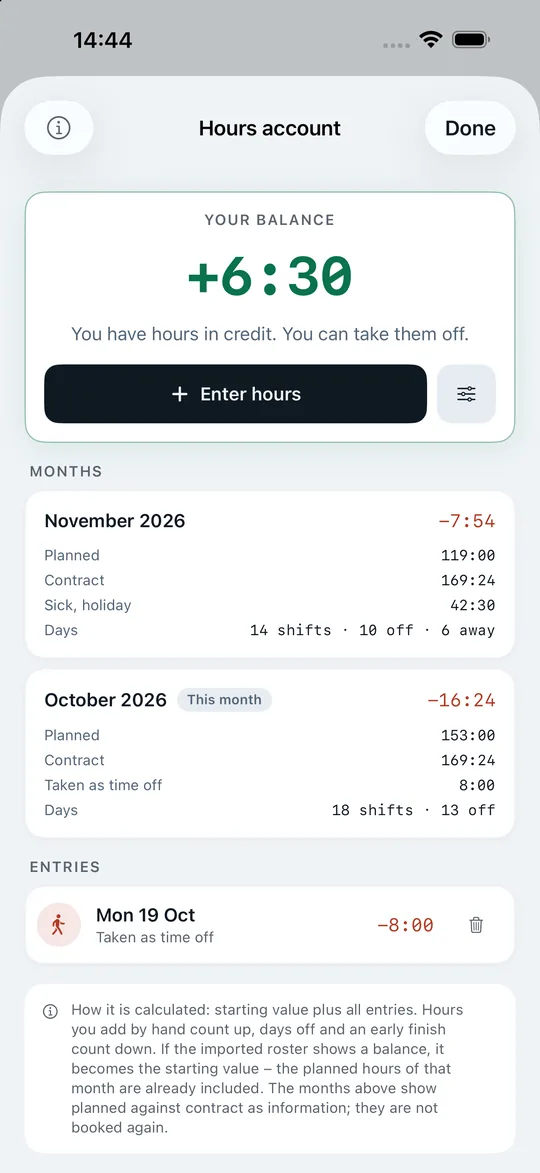
-
10 · Public holidays
Christmas Eve gets sorted in summer
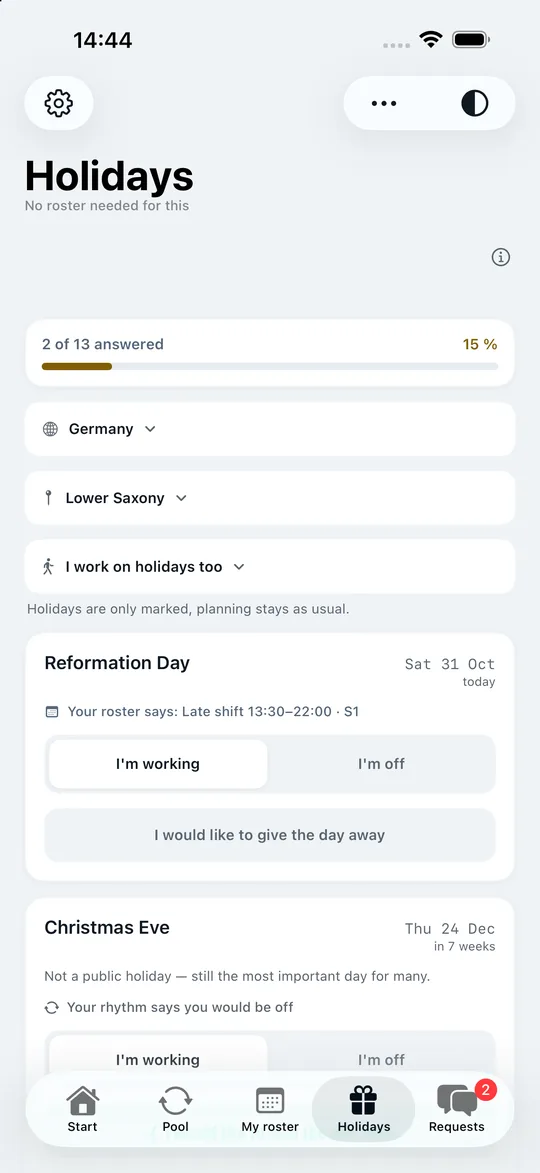
Public holidays are calculated for your German state – and for 20 more countries from Austria to New Zealand. Christmas Eve and New Year’s Eve are always included: not public holidays by law, but for shift workers the most important days of the year. If one is missing – the company holiday, the local fair – you add it yourself.
For each date you say whether you are working or off, and whether you would like to swap. If the roster is already there, it shows what it says; otherwise, what your rhythm predicts. You do not even need a roster for that.
-
11 · Without opening the app
Lock Screen, Dynamic Island and widgets
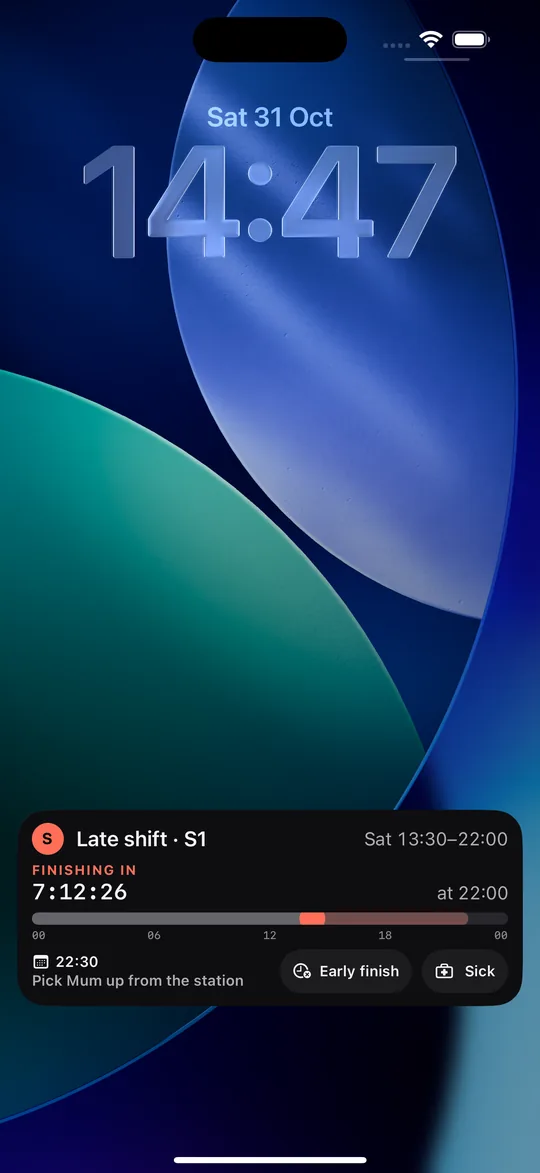
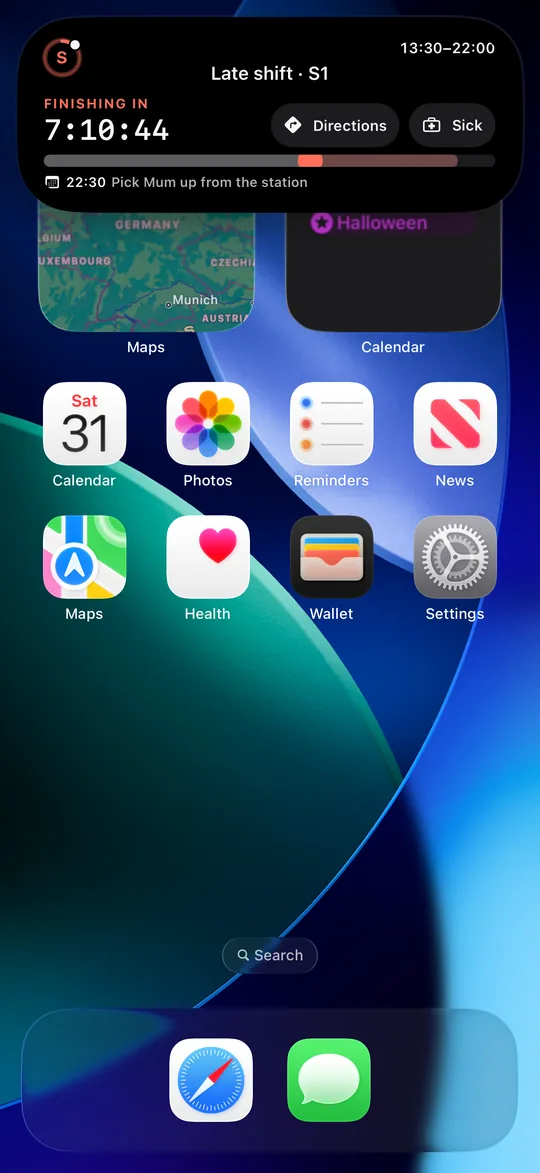
From a few hours before your shift starts, it appears on the Lock Screen and in the Dynamic Island – and keeps counting by itself, even when the app is closed.
- First the countdown, then the finish: “Starts in …” becomes “Finishes in …”. A ring around the shift letter fills up as the shift goes on, and the shift band shows where you are right now.
- What comes next: your next appointment of the day or your next shift. One tap opens the day in “My roster”.
- “Sick” and, while the shift is running, “Early finish” right on the Lock Screen – nothing is entered until you confirm it in the app. If an appointment with a place is coming up, the Dynamic Island shows “Get directions” instead.
- Where your swap stands: requested, names shared, agreed, approved – and a sentence saying whose turn it is. Never with real names or chat.
- Appointments without a shift get their own display with countdown and “Get directions”.
- Widgets: next shift, your week or two, hours account, pool and requests – with your appointments inside. For the Home Screen and Lock Screen, including StandBy.
On sick days and holiday leave there is no shift display on the Lock Screen. The widget shows “On holiday today” for holiday leave, and for sick days only a neutral “No shift today” – the reason stays in the app. The Lock Screen displays can be turned off in Settings.
-
12 · Group & invitation
Your group, with no boss and no permanent code
A group is a ward, a department, a site – and can grow as large as you like. Anyone already in brings colleagues in:
- Personal invitation: a six-digit code, valid for 10 minutes, 1 hour or 24 hours. Everyone can have up to three on the go at once.
- Printed notice: for starting a large group – no limit on members, for 7, 14 or 30 days. Printed as an A4 sheet with a QR code, it hangs on the notice board, and the app reminds you three days before it expires. The others see that a notice is open, but never the code – and can ask you for it with one tap. Only you can close it.
- Find your group: if you cannot reach anyone with a code, enter your workplace and location and ask to join. A member checks in the chat whether the person really belongs.
- Everyone sees who is new: for a week, the Start screen shows who has joined and who invited them. If someone does not belong, two votes remove them again (in a group of two, one is enough) – reversible, also with two votes.
There is no admin role in the group. It stays fully functional even if the person who created it leaves the workplace. Reports of violations are reviewed by us as the operator.
For the notice board
One printed notice that brings in the whole ward.
To start a group, Shiftpool prints an A4 sheet: the code as large as a ticket, a QR code, three steps and what the app does for your colleagues. Whoever scans the QR code lands on this website and sees the code ready to copy.
- No limit on members – but a deadline: 7, 14 or 30 days, after which the code is worthless.
- Readable in black and white too, with a margin for every printer. Print it or pass it on as a PDF.
- A reminder three days before the notice expires. Only you can close it.
- Safe: everyone sees who is new for a week. If someone does not belong, two votes remove them again – in a group of two, one is enough.
Ask first whether you may put it up on the notice board.

And there’s more
Get Shiftpool
Your next swap takes three taps.
Get the app, create the group for your ward and send the code to two colleagues. From then on the pool fills itself – and your roster, your year and your hours account work from day one, even on your own.
Free download – for iPhone with iOS 17 or later.

iPhoneOn the App Store · iOS 17 or later · English and German
AndroidPlanned for later – as its own app on the same servers, so iPhone and Android can swap in one group.