Swap shifts on the ward – without the phone chain.
Your colleague needs Saturday off, you would rather have Wednesday: in nursing, the swapping never stops. Shiftpool turns it into a clear agreement – for the whole ward, without the hospital having to roll out any software.

What annoys nurses about swapping
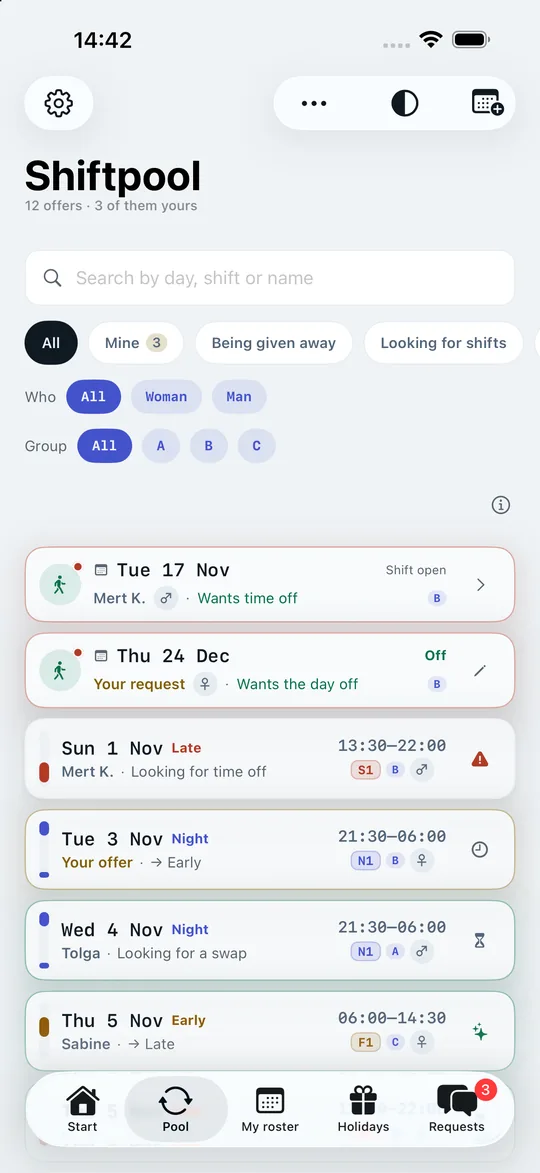
A nursing roster rarely survives a whole month. Colleagues off sick, last-minute absences, training courses, days off requested for family occasions – all in a team where every shift has to be covered. So there is a lot of swapping: in the ward corridor, on a note in the staff room, in the ward’s WhatsApp group. There a request gets buried between holiday photos and parking notices, and nobody knows for sure whether “I’ll have a look” already counted as a yes.
Then there is privacy: in the ward group everyone sees everyone’s phone number – including the temp who leaves again after three months.
How a ward uses Shiftpool
- The ward is the group. One colleague creates “Ward 3B”, the others join with a personal code or via a printed notice with an expiry date. Nicknames are enough.
- Shifts into the pool: early, late, night, mid shift – with your hospital’s own shift codes and the real times.
- Register requested days off early: Christmas Eve, the wedding in June, the kids’ end-of-year party. Requested days off sit in the pool long before the month’s roster is finished – marked as urgent, without you having to explain why.
- Stepping in made easy: anyone who wants to take on extra shifts sets “Looking for shifts”. Anyone who has to give away a shift sees at once who might take it.
Rest time in view – especially after a night shift
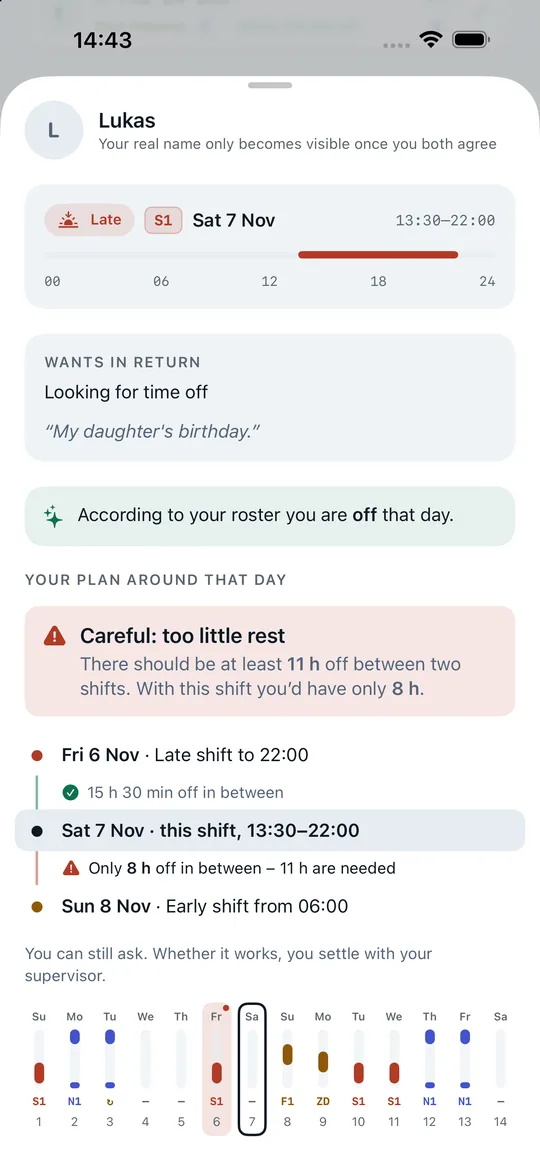
Under the German Working Hours Act you are entitled to eleven hours of uninterrupted rest after a shift ends. In hospitals and care facilities it may be shortened by up to one hour if the time is made up within a calendar month or four weeks. Anyone who takes an early shift at 6:00 after a late shift ending at 22:00 gets just eight hours.
Shiftpool works this out for every shift you would take on – against your own roster, for the day before and the day after – and also warns you if it would be your seventh shift in a row. As a hint, not a ban: what is possible in a given case is for you and your ward manager to settle. More on rest time in shift work
The ward manager approves – as always
Shiftpool does not change the hospital’s roster and has no access for managers. You settle the swap among yourselves, and one of you calls or speaks to the ward manager. The app records who takes that on, and afterwards both of you enter the outcome. Only then does the swap count.
Health data stays on your device
Sick days, holiday and your roster with shifts and times are stored in Shiftpool on your iPhone. The server receives – only while “Notify me about new shifts” is on – nothing but the days you are off or said you would like to work, so the app can point you to matching shifts. Sick days and holidays do not count as days off there; the reason stays with you. On sick days the widget just says, neutrally, “No shift today”. The app creates a backup in your own iCloud only if you expressly agree – and points out the sick days when it does.
Common questions from nursing
Does the nursing director or the works council have to approve?
Not for the app itself: Shiftpool is a notice board for employees, with no link to the rostering software and no access for managers. Every single swap, though, still needs the ward manager’s approval, as before – the app changes nothing there.
Does the app work with mid shifts and split shifts?
Yes. Every day has its own time and its own shift code, say “ZD” from 9:00 to 17:30. The colour follows the time.
Can colleagues from the float pool join too?
Yes, anyone with an invitation can join the group. Anyone who works on several wards can only be in one group at a time, though – so a group for the whole department makes sense.
Your next swap takes three taps.
Get the app, create the group for your ward and send the code to two colleagues. From then on the pool fills itself – and your roster, your year and your hours account work from day one, even on your own.
Free download – for iPhone with iOS 17 or later.